What happens when Elasticsearch starts for the first time, and why do you have to act quickly when connecting Kibana?
On its first start, Elasticsearch configures security automatically: it generates TLS certificates, a password for the elastic superuser and an enrollment token for Kibana. The token expires after a short time (30 minutes), so Kibana must be unpacked and ready before Elasticsearch is started.
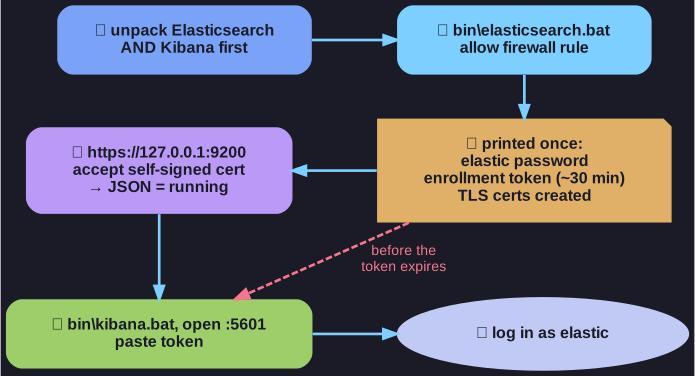
* Credentials and the token are printed once; Kibana has to be ready in time. *
The sequence:
- Unpack both Elasticsearch and Kibana first.
- Start
bin\elasticsearch.bat(no admin rights needed). Allow the firewall rule it requests. - Copy the generated
elasticpassword and the enrollment token somewhere safe; they are printed only once. - Check
https://127.0.0.1:9200/: after accepting the self-signed certificate warning and logging in aselastic, a JSON response means Elasticsearch is running. - Start
bin\kibana.batin a second console, open the URL it prints (port 5601), and paste the enrollment token. - Log in to Kibana as
elasticwith the same password.
Security is on by default because Elasticsearch clusters left open on the internet were a common cause of large data leaks. The certificate warning appears because the certificate is signed by a CA Elasticsearch created itself; importing that CA into the trusted root store removes it. Ctrl+C in the console stops each program.
Go deeper:
 Elastic — Automatic security setup — what the first start generates, and the 30-minute enrollment token.