Question
What is Sysmon, and what kinds of activity does it record on a Windows host?
Answer
Sysmon (System Monitor) is a free Sysinternals tool that runs as a Windows service plus a kernel driver and writes detailed security-relevant activity into the Windows Event Log: process starts with command lines, network connections, file hashes, DLL loads, registry changes and more.
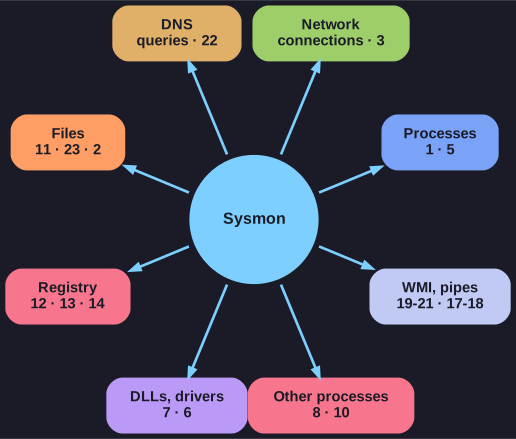
* One sensor, eight families of evidence; the numbers are the Sysmon event IDs. *
It was written by Mark Russinovich as part of the Sysinternals suite, now published by Microsoft. What it logs:
- Process creation, with the full command line, the parent process and its command line, the user, and the hash of the executable.
- Network connections, with the process that opened them, source and destination IPs, ports and hostnames.
- Hashes of process images (SHA1, MD5, SHA256 or IMPHASH), so a binary can be checked against threat intelligence even if it was renamed.
- DLL and driver loading, with hashes and signature status.
- File changes, including the tell-tale case of a process rewriting a file's creation time.
- Registry changes, named pipes, WMI persistence, DNS queries, file deletions and more.
A quick look at these events is often enough to spot malware, intrusions and breaches. The data is only valuable if someone reads it, though, which is why the next step is always to ship it to a central search tool such as Splunk or Elasticsearch.
Go deeper:
 Microsoft Learn — Sysmon — the official download page, with the full event list and command-line options.
- Sysinternals — Wikipedia — the tool suite Sysmon belongs to, and its history.
Note saved — thanks!
Question
Windows already has an event log. Why do defenders install Sysmon on top of it?
Answer
Because Windows' built-in logging is thin exactly where investigations need detail: it does not hash executables, does not record network connections per process, and by default does not log command lines, while Sysmon fills those gaps.
The standard Security log can record a process start (event 4688), but out of the box without the command line, without a file hash and without the parent's command line. Network connections are not tied to processes at all unless extra auditing is enabled. Those are the very details an analyst needs to answer "what ran, who started it, what did it talk to?"
| Question | Default Windows logging | With Sysmon |
|---|---|---|
| What was executed, with which arguments? | Often no command line | Full command line (event 1) |
| Is this binary known malware? | No hash | SHA256/MD5/IMPHASH of the image |
| Who launched it? | Parent PID only | Parent image and parent command line |
| Which process opened this connection? | Not recorded | Process, IPs, ports, hostnames (event 3) |
| Did anything touch LSASS memory? | Not recorded | ProcessAccess with access mask (event 10) |
Default Windows logging is not that advanced, and Sysmon can easily fill those gaps. Forwarding both to a SIEM gives the best picture.
Go deeper:
- Microsoft Learn — Event 4688: a new process has been created — what the built-in process-creation event contains, and what it needs extra policy for.
Note saved — thanks!