What does the SPL transaction command do, and what does transaction clientip startswith="signon" endswith="purchase" return?
transaction groups events that belong together into one combined result; this example groups each client IP's events into sessions that begin with a sign-on and end with a purchase.
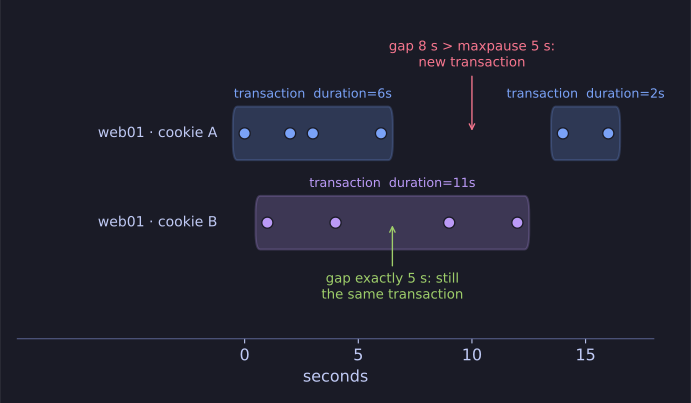
* Same host and cookie, no pause longer than 5 s: one transaction. *
Log events rarely describe a whole activity on their own. A customer's visit is dozens of separate lines. transaction stitches them together by shared field values and time constraints:
- By field(s):
transaction host cookiegroups events with the same host and cookie. - By time:
maxspan=30slimits a transaction's total length;maxpause=5sends it when there is more than 5 s between consecutive events. - By boundary events:
startswith="signon" endswith="purchase"defines where a transaction begins and ends.
Each resulting transaction gets fields such as duration and eventcount. So you can answer questions like "how long does it take from sign-on to purchase?" or, in security, "show every session in which a logon was followed by a privilege change within 60 seconds".
It is convenient but costly on large data sets; when a simple grouping key exists, stats … by does the same job faster.
Go deeper:
 Splunk — transaction — every option, and when to prefer stats.