Quiz Entry - updated: 2026.09.24
What does error earliest=-1d@d latest=-1h@h mean in Splunk, and how does "snapping" work?
Events containing "error" from yesterday at midnight until the start of the current hour: -1d@d means go back one day, then round down to the start of that day; -1h@h means go back one hour, then round down to the full hour.
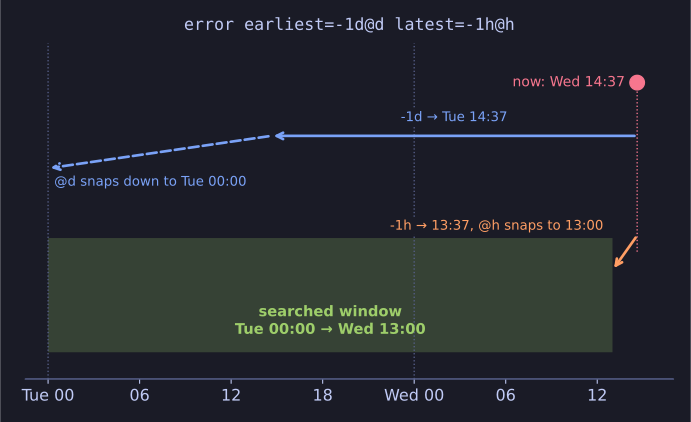
* Go back, then round down: the window is whole days and hours, not rolling. *
Relative time modifiers have the form [+|-]<integer><unit>@<snap_unit>:
- Units:
sseconds,mminutes,hhours,ddays,wweeks,monmonths,qquarters,yyears. The integer defaults to 1, somequals1m. - Snapping (
@) rounds down to the start of the given unit. At 11:59,@hsnaps to 11:00, not 12:00. - Weekdays:
@w0snaps to Sunday,@w1to Monday, and so on.
Worked example, if it is now 14:37 on Wednesday:
| Modifier | Resolves to |
|---|---|
-1d@d |
Tuesday 00:00 |
-1h@h |
Wednesday 13:00 |
@w1 |
Monday 00:00 of this week |
Snapping makes reports reproducible: "yesterday" means the whole calendar day regardless of when the search runs, instead of "the last 24 hours from right now".
Go deeper:
 Splunk — Specify time modifiers in your search — the full syntax, including snapping to weekdays.