Quiz Entry - updated: 2026.08.27
What are the six steps to configure SSH (Secure Shell) on a Cisco switch?
Verify SSH support → set IP domain → generate RSA keys → create a local user → configure the VTY (Virtual Teletype) lines for SSH → force SSH version 2.
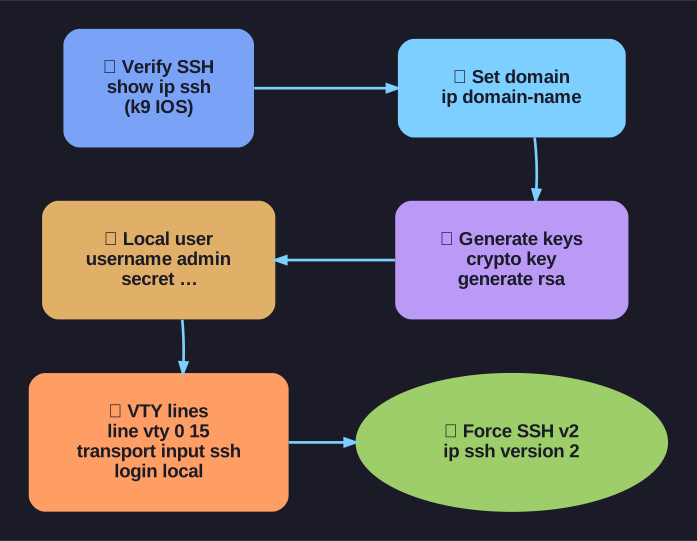
* The six steps to enable SSH. *
Prerequisites: The switch must have a unique hostname and correct network settings.
| Step | Action | Command |
|---|---|---|
| 1 | Verify SSH support | show ip ssh (must be recognized — needs crypto-capable IOS) |
| 2 | Configure IP (Internet Protocol) domain | ip domain-name domain-name |
| 3 | Generate RSA key pairs | crypto key generate rsa (this automatically enables the SSH server) |
| 4 | Configure user authentication | username admin secret password |
| 5 | Configure VTY lines | line vty 0 15 → transport input ssh → login local |
| 6 | Enable SSH version 2 | ip ssh version 2 |
Important notes:
- The IOS filename must contain "k9" to indicate cryptographic support (e.g.,
c2960-lanbasek9-mz) - To delete RSA keys and disable SSH:
crypto key zeroize rsa - Use
show ip sshto verify SSH version and settings - Use
show sshto see active SSH connections
Go deeper:
 RSA (cryptosystem) (Wikipedia) — the public/private key pair that
 crypto key generate rsacreates.- RFC 4253 — SSH Transport Layer Protocol — the canonical spec for the SSHv2 transport you force with
ip ssh version 2.