Question
What are the five steps in the Cisco switch boot sequence?
Answer
POST (Power-On Self-Test) → Boot Loader → CPU (Central Processing Unit) init → Flash init → Load IOS — a power-on hardware check, then the bootloader initializes hardware and loads the operating system.
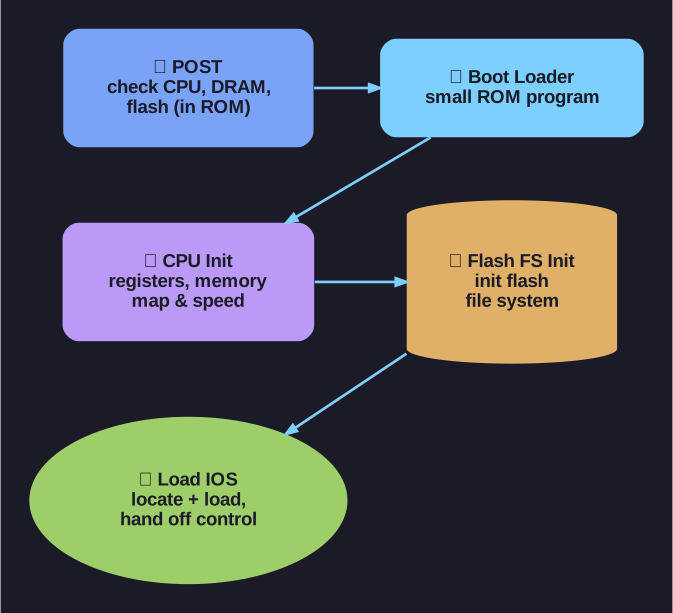
* The five-step switch boot sequence. *
- POST: Stored in ROM (Read-Only Memory), checks CPU, DRAM (Dynamic Random-Access Memory), and flash file system
- Boot Loader: Small program in ROM, runs immediately after POST completes
- CPU Initialization: Boot loader initializes CPU registers — controls memory mapping, memory quantity, and speed
- Flash File System Init: Boot loader initializes the flash file system on the system board
- Load IOS: Boot loader locates and loads the default IOS image into memory, then hands control to IOS
Tip: Think of it like booting a PC — hardware check first (POST), then the BIOS/bootloader initializes hardware, then the OS loads from disk (flash).
Go deeper:
 Booting (Wikipedia) — the universal POST → bootloader → OS-load chain the Cisco sequence mirrors.
- Power-on self-test (Wikipedia) — what POST actually checks (CPU, DRAM, firmware) before the bootloader runs.

Note saved — thanks!
Question
What does the boot system command do on a Cisco switch, and what happens if the BOOT variable is not set?
Answer
Sets the BOOT environment variable that tells the switch which IOS image to load from flash; if it is not set, the switch just loads the first executable file it can find.
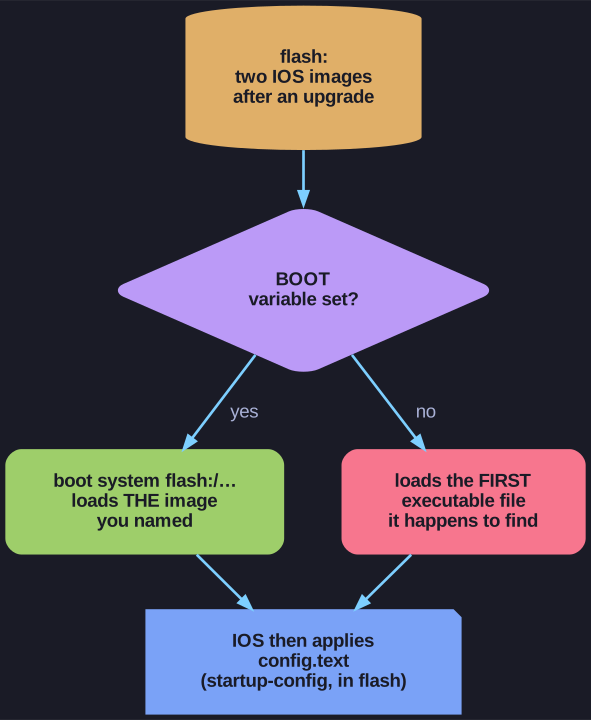
* Setting BOOT makes the running image a decision rather than an accident. *
S1(config)# boot system flash:/c2960-lanbasek9-mz.150-2.SE/c2960-lanbasek9-mz.150-2.SE.bin
Command breakdown:
| Component | Meaning |
|---|---|
boot system |
The main command |
flash: |
The storage device |
c2960-lanbasek9-mz.150-2.SE/ |
Path to the file system (folder) |
c2960-lanbasek9-mz.150-2.SE.bin |
The IOS file name |
If the BOOT variable is not set: the switch loads and executes the first executable file it can find in flash. That is exactly why pinning the image matters. A switch that has collected two IOS images — after a half-finished upgrade, say — would otherwise boot whichever one the file system happens to hand over first, so the version running on your network becomes an accident rather than a decision. Setting boot system makes the choice explicit and survives the next reload.
Once IOS is up it applies the commands in the startup-config file, which on a switch is named config.text and also lives in flash (a router keeps its startup-config in NVRAM (Non-Volatile Random-Access Memory) instead). Read the current setting back with show boot.
Note saved — thanks!