Quiz Entry - updated: 2026.09.24
What are events, fields and tags in Splunk?
An event is one timestamped data record, a single or multi-line entry; fields are searchable name-value pairs extracted from it; tags are aliases you attach to field values to group or label them.
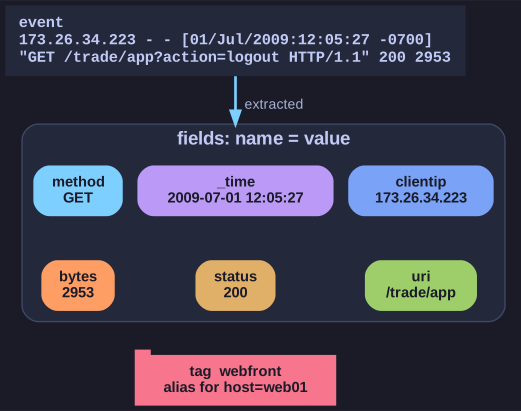
* One event, many name-value fields; a tag is a friendly alias on top. *
- Event: a set of values with a timestamp. It can be one log line, a multi-line stack trace, or a whole configuration file. Example web-log event:
173.26.34.223 - - [01/Jul/2009:12:05:27 -0700] "GET /trade/app?action=logout HTTP/1.1" 200 2953. - Field: a name-value pair such as
clientip=173.26.34.223orstatus=200. Not every event has the same fields, which is what distinguishes them. Fields make searches precise:status=404instead of hoping the text "404" appears somewhere. - Tag: a meaningful label for a field value. Tagging
ip=10.0.0.5asmailserver, or several hosts asdmz, lets you searchtag=dmzwithout remembering addresses.
Related search-time concepts: event types classify events that match a search string, and transactions group events that belong together over a time span, such as all events from one customer session.
Go deeper:
 Splunk — Wikipedia — the product and its history.