Question
What separates a single-board computer like the Raspberry Pi from a microcontroller board like the Arduino Uno, and why does it matter for an IoT design?
Answer
A single-board computer has an application processor, gigabytes of RAM and runs a full OS such as Linux. A microcontroller board has kilobytes of RAM, runs one bare-metal or RTOS program, and uses a tiny fraction of the power.
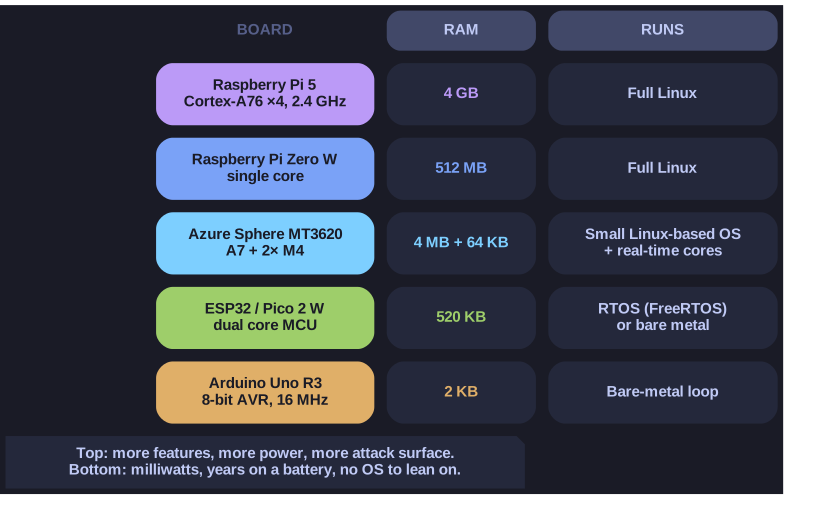
* IoT boards span six orders of magnitude of RAM. The OS a board can run follows from where it sits. *
IoT development boards form a spectrum rather than two boxes, but the two ends behave very differently:
| Single-board computer (SBC) | Microcontroller (MCU) board | |
|---|---|---|
| Examples | Raspberry Pi 3 B+ / 4 B / 5, Pi Zero W | Arduino Uno R3, ESP32, Raspberry Pi Pico 2 W, Photon |
| Processor | ARM Cortex-A class, up to 4 cores at 1-2.4 GHz | Cortex-M, AVR or Xtensa, tens to a few hundred MHz |
| Memory | 512 MB to several GB of RAM, OS on a microSD card | 2 KB to ~520 KB of SRAM, program in on-chip flash |
| Software | Full OS (Linux) with processes, drivers, a file system | Bare-metal loop or a small RTOS, one firmware image |
| Power | Watts; needs a proper supply | Milliwatts, down to microamps in deep sleep; battery-friendly |
| Boot | Seconds | Milliseconds |
The choice decides nearly everything downstream. On a Pi you get the whole Linux ecosystem (Python, a TCP/IP stack, SSH, package updates) and also the whole Linux attack surface. On an MCU there is no OS to lean on and no room for one: an Arduino Uno's ATmega328P has 2 KB of SRAM in total, while a 4 GB Raspberry Pi 5 has about two million times as much. That is why a sensor node that must run for years on a battery is an MCU, and a gateway that aggregates many sensors and speaks to the cloud is often an SBC.
Hybrids sit in between. The Azure Sphere MT3620 pairs a Cortex-A7 running a small Linux-based OS with Cortex-M4 cores for real-time work, and the ESP32 is an MCU with Wi-Fi, Bluetooth and hardware crypto built in.
Tip: read the RAM figure first. Megabytes or more means "can run Linux"; kilobytes means "bare metal or RTOS".
Go deeper:
 Wikipedia — Microcontroller — what puts CPU, flash, RAM and peripherals on one chip, and why that makes the part cheap and frugal.
- Wikipedia — Single-board computer — the other end of the spectrum: a complete computer on one board, the Raspberry Pi being the best-known.
Note saved — thanks!
Question
An Arduino Uno R3 has 32 KB of flash, 2 KB of SRAM and 1 KB of EEPROM. What is each memory used for?
Answer
Flash holds the program, SRAM holds the variables while it runs, and EEPROM keeps small settings across power cycles.
The three memories differ in whether they survive power loss and how often they can be written:
| Memory | Keeps data without power? | Holds | Constraint |
|---|---|---|---|
| Flash (32 KB) | Yes | The compiled program (the "sketch"); about 0.5 KB is taken by the bootloader | Written when you upload new firmware, not during normal running |
| SRAM (2 KB) | No | Global variables, the stack, the heap; everything the program changes at runtime | Fast and unlimited writes, but tiny and lost on reset |
| EEPROM (1 KB) | Yes | Small persistent values: a calibration offset, a device ID, a counter | Byte-writable but wears out, roughly 100,000 write cycles per cell |
The 2 KB of SRAM is the one that bites in practice. A few string literals, a buffer for a serial line and a recursive function can exhaust it, and the result is not an error message but a stack colliding with the heap, which corrupts variables at random. That is why embedded C avoids dynamic allocation and large local arrays.
The newer Arduino Uno WiFi Rev2 (ATmega4809) raises this to 48 KB flash and 6 KB SRAM with 256 bytes of EEPROM, which is still tiny next to the ESP32's 520 KB of SRAM.
Tip: Flash = the program, SRAM = the scratchpad, EEPROM = the notebook.
Go deeper:
- Arduino Docs — UNO R3 — the official board page with the ATmega328P's memory, clock and pin specifications.
Note saved — thanks!