Question
What is a VLAN and what are its key benefits?
Answer
A VLAN (Virtual Local Area Network) is a logical grouping of devices on one or more switches that creates separate broadcast domains, regardless of physical location.
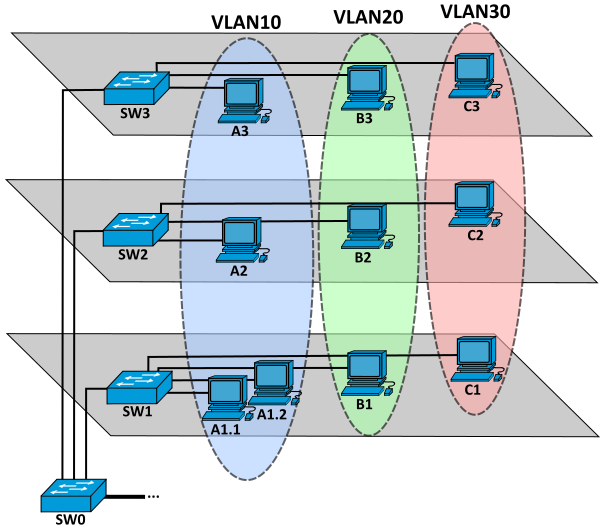
VLANs as logical broadcast domains across switches. — Michel Bakni, CC BY-SA 4.0, via Wikimedia Commons.
Without VLANs, all devices connected to a switch share the same broadcast domain — every broadcast reaches every device. VLANs solve this by creating logical segments at Layer 2.
Key benefits:
| Benefit | Why It Matters |
|---|---|
| Smaller broadcast domains | Fewer devices receive each broadcast → less wasted bandwidth |
| Improved security | Only devices in the same VLAN can communicate directly at Layer 2 |
| Improved IT efficiency | Group devices by function (e.g., faculty vs. students) rather than physical location |
| Reduced cost | One switch can serve multiple groups — no need for separate physical switches |
| Better performance | Smaller domains = less unnecessary traffic |
| Simpler management | Similar groups share the same applications and network policies |
Each VLAN gets its own IP (Internet Protocol) subnet (e.g., VLAN 10 = 10.0.2.0/24, VLAN 20 = 10.0.3.0/24). Devices in different VLANs cannot communicate without a Layer 3 device (router or Layer 3 switch).
Tip: Think of VLANs as invisible walls inside a switch — devices on the same VLAN can talk freely, but crossing VLAN boundaries requires a router.
Go deeper:
 Virtual LAN (Wikipedia) — defines VLANs as logical broadcast domains and lays out the segmentation/security/management benefits, with topology diagrams.

Note saved — thanks!
Question
What is VLAN 1, and why does Cisco recommend moving its default functions to other VLANs?
Answer
VLAN (Virtual Local Area Network) 1 is the default VLAN on Cisco switches — it serves as the default data VLAN, native VLAN, and management VLAN, and it cannot be deleted or renamed.
VLAN 1's three default roles:
- Default VLAN — all switch ports are members of VLAN 1 out of the box
- Default Native VLAN — untagged traffic on trunk links is assumed to belong to VLAN 1
- Default Management VLAN — SSH/Telnet management traffic uses VLAN 1
Why move away from VLAN 1?
Security. Since VLAN 1 is the well-known default, attackers know to target it. Cisco best practice is to:
- Assign user data traffic to other VLANs (e.g., VLAN 10, 20, 30)
- Change the native VLAN on trunks to something other than VLAN 1 (e.g., VLAN 99)
- Use a dedicated management VLAN for switch administration
You can also see the legacy VLANs (1002–1005) in show vlan brief — these exist for FDDI and Token Ring compatibility and also cannot be deleted.
Go deeper:
 VLAN hopping (Wikipedia) — why default-VLAN-1 placement is an attack surface and should be moved off.
Note saved — thanks!