Question
What are the two primary functions of a router?
Answer
A router's two functions are: (1) determine the best path to the destination using its routing table, and (2) forward the packet toward that destination by encapsulating it in the appropriate Layer 2 frame.
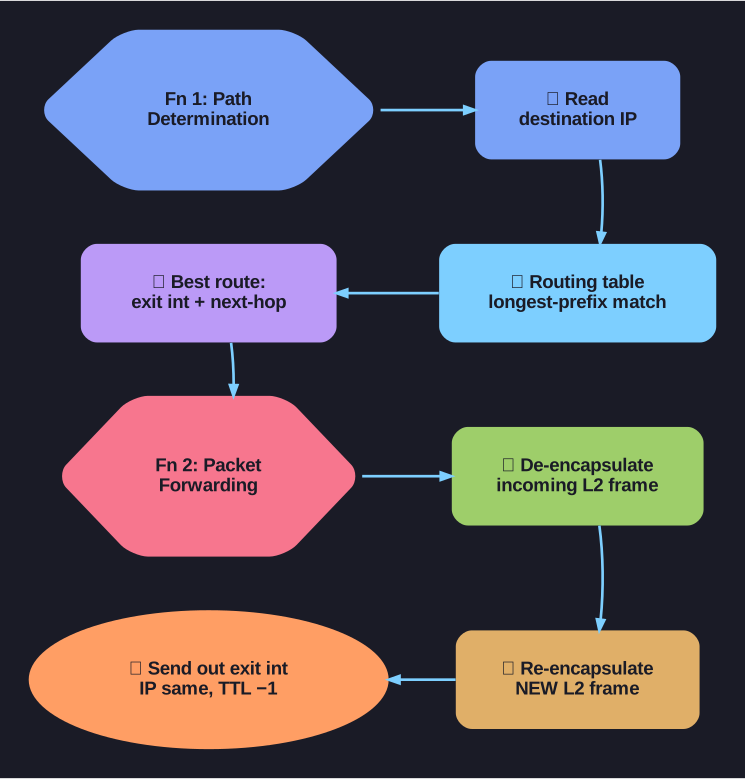
* A router's two jobs: path determination and forwarding. *
Function 1 — Path Determination:
- Router receives a packet on an interface
- Examines the destination IP (Internet Protocol) address
- Searches its routing table for the best matching route
- The best match is determined by the longest prefix match — the route with the most specific (longest) subnet mask wins
Function 2 — Packet Forwarding:
- After determining the best path, the router identifies the exit interface and next-hop IP
- De-encapsulates the received Layer 2 frame
- Re-encapsulates the packet in a new Layer 2 frame for the exit interface
- Forwards the new frame out the exit interface
Key insight: The IP (Internet Protocol) packet (Layer 3) stays essentially unchanged hop-by-hop — only the TTL (Time to Live) decrements. But the Layer 2 frame (Ethernet header) is rebuilt at every router hop with new source and destination MACs (Media Access Control addresses).
Tip: Think of the router as a mail sorting facility: it reads the destination address (IP), determines which truck goes to that zip code (routing table), and puts the letter in a new envelope for the next leg of the journey (new L2 frame).
Go deeper:
 Router (computing) (Wikipedia) — the path-determination plus forwarding split the card describes.
- Routing (Wikipedia) — separates route selection from per-packet forwarding.

Note saved — thanks!
Question
How does a router use the show ip route command output to forward packets?
Answer
The show ip route output displays all known routes with their source codes, destination networks, prefix lengths, next-hop addresses, and exit interfaces. The router searches this table for each packet's destination IP (Internet Protocol) using longest prefix match.
Reading the routing table output:
R1# show ip route
Codes: L - local, C - connected, S - static, R - RIP, M - mobile, B - BGP
       D - EIGRP, EX - EIGRP external, O - OSPF, IA - OSPF inter area

Gateway of Last Resort is not set

C    192.168.1.0/24 is directly connected, GigabitEthernet0/0
L    192.168.1.1/32 is directly connected, GigabitEthernet0/0
Route codes and what they mean:
| Code | Source | How Learned |
|---|---|---|
| C | Directly Connected | Interface with IP is up/up |
| L | Local | /32 host route for router's own interface IP |
| S | Static | Manually configured by admin |
| O | OSPF (Open Shortest Path First) | Learned dynamically via OSPF |
| D | EIGRP (Enhanced Interior Gateway Routing Protocol) | Learned dynamically via EIGRP |
| R | RIP (Routing Information Protocol) | Learned dynamically via RIP |
| B | BGP | Learned dynamically via BGP |
| S* | Default Static | Gateway of last resort (0.0.0.0/0) |
Tip: Routers use the routing table like a map to find the best path for a given destination. The more specific the route (longer prefix), the more preferred it is.
Go deeper:
- Routing table (Wikipedia) — the fields (destination/netmask, next hop, interface, metric) the output renders.

Note saved — thanks!