Question
What are the common types of static routes, and what is each used for?
Answer
Four formal types — standard (to a specific network), default (catch-all 0.0.0.0/0), floating (backup with a higher AD (Administrative Distance)), and summary (aggregate multiple subnets) — plus the host route (/32 or /128 to one device).
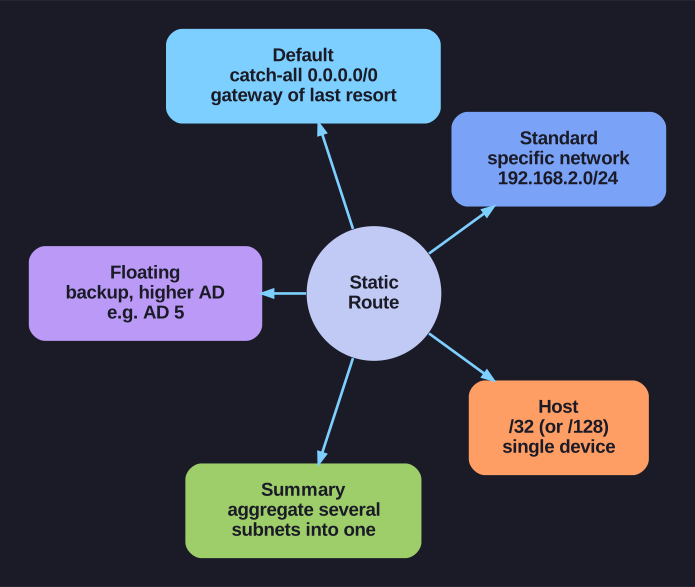
* The static-route types. *
Cisco groups static routes into four formal types — standard, default, floating, and summary. The host route (a /32 IPv4 or /128 IPv6 route to a single device) is a fifth practical variant the same ip route command produces; all of them come from one syntax and differ only in the destination prefix and administrative distance you give it.
| Type | Command Example | Use Case |
|---|---|---|
| Standard | ip route 192.168.2.0 255.255.255.0 172.16.2.2 |
Reach a specific remote network |
| Default | ip route 0.0.0.0 0.0.0.0 172.16.2.2 |
Gateway of last resort — catches all unmatched traffic |
| Floating | ip route 10.1.0.0 255.255.0.0 10.0.0.2 5 |
Backup route with higher AD — only active when primary fails |
| Summary | ip route 172.16.0.0 255.255.0.0 10.0.0.2 |
Aggregate multiple subnets into one route entry |
| Host | ip route 209.165.200.238 255.255.255.255 198.51.100.1 |
Route to a specific single device (/32 mask) |
Static routes are used even when dynamic routing is configured:
- Default route to the ISP (outside the dynamic routing domain)
- Stub networks with only one exit path
- Backup connections (floating static)
- When the admin needs explicit path control
Command syntax:
Router(config)# ip route network-address subnet-mask { ip-address | exit-intf [ip-address] } [distance]
Router(config)# ipv6 route ipv6-prefix/prefix-length { ipv6-address | exit-intf [ipv6-address] } [distance]
Go deeper:
 Static routing (Wikipedia) — the general static-route concept the five variants specialize.
- Default route (Wikipedia) — the 0.0.0.0/0 and ::/0 catch-all that is the default type.
Note saved — thanks!
Question
What is the IPv4 static route command syntax, and what are the three ways to specify the next hop?
Answer
The command is ip route network mask {next-hop | exit-interface | both} [AD]. The three forms are: next-hop IP (Internet Protocol) only (recursive lookup), exit interface only (directly connected behavior), or fully specified (both — recommended for Ethernet).
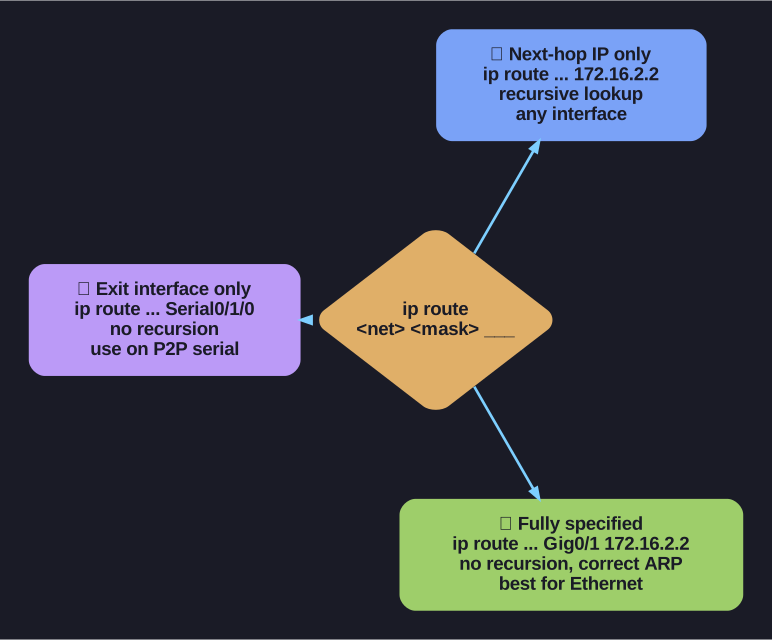
* Three ways to specify the next hop. *
Form 1 — Next-hop IP only (most common):
R1(config)# ip route 172.16.1.0 255.255.255.0 172.16.2.2
- Router performs a recursive lookup — first finds the route to 172.16.2.2, then uses that route's exit interface
- Works on any interface type (serial, Ethernet, tunnel)
- Routing table shows:
S 172.16.1.0/24 [1/0] via 172.16.2.2
Form 2 — Exit interface only (directly connected static):
R1(config)# ip route 172.16.1.0 255.255.255.0 Serial0/1/0
- No recursive lookup needed — sends out the specified interface directly
- On point-to-point links (serial): Works perfectly — there's only one neighbor
- On multi-access links (Ethernet): Problematic — router sends ARP (Address Resolution Protocol) for every destination IP on that interface, relying on Proxy ARP
- Routing table shows:
S 172.16.1.0/24 is directly connected, Serial0/1/0
Form 3 — Fully specified (both — recommended for Ethernet):
R1(config)# ip route 172.16.1.0 255.255.255.0 GigabitEthernet0/1 172.16.2.2
- Specifies both the exit interface AND the next-hop IP
- No recursive lookup, no Proxy ARP issues
- Best practice for Ethernet/multi-access interfaces
Tip: Use next-hop IP for most situations. Use fully specified routes when the exit interface is Ethernet. Only use exit-interface-only on point-to-point serial links.
Go deeper:
- Proxy ARP (Wikipedia) — the Proxy-ARP behaviour that makes exit-interface-only routes problematic on Ethernet.
Note saved — thanks!