Question
What problem do First Hop Redundancy Protocols (FHRPs) solve, and why can't hosts simply be configured with two default gateways?
Answer
FHRPs (First Hop Redundancy Protocols) prevent the loss of outside LAN (Local Area Network) connectivity when the default gateway router fails. Hosts can't use two gateways because they're typically configured with only a single default gateway IP (Internet Protocol) — there's no built-in failover mechanism at the host level.
The core problem:
- End devices (PCs, phones, printers) are configured with one default gateway IPv4 address
- If that gateway router's interface goes down → all hosts lose connectivity to external networks
- This happens even if a perfectly functional redundant router exists on the same VLAN (Virtual Local Area Network)
Why not just configure two gateways on the host?
- Most operating systems only use one default gateway at a time
- Even if you configure two, there's no reliable mechanism for the host to detect the failure and switch
- The failover time would be unpredictable and different per OS
How FHRPs solve this:
- Multiple physical routers are configured to present the illusion of a single virtual router to the hosts on the LAN
- They share a virtual IP address and a virtual MAC (Media Access Control) address
- Hosts point their default gateway to the virtual IP — they never need to change
- The FHRP protocol handles all the failover logic transparently
Tip: From the host's perspective, there is only one router (the virtual one). The fact that multiple physical routers back it up is completely invisible.
Go deeper:
 First-hop redundancy protocol (Wikipedia) — frames the single-default-gateway redundancy problem and lists the protocol family.
Note saved — thanks!
Question
What is a virtual router in the context of FHRPs, and how does it use shared IP and MAC addresses?
Answer
A virtual router is a logical router presented to hosts by multiple physical routers working together. It has its own virtual IP (Internet Protocol) address (used as default gateway) and virtual MAC (Media Access Control) address (resolved via ARP (Address Resolution Protocol)).
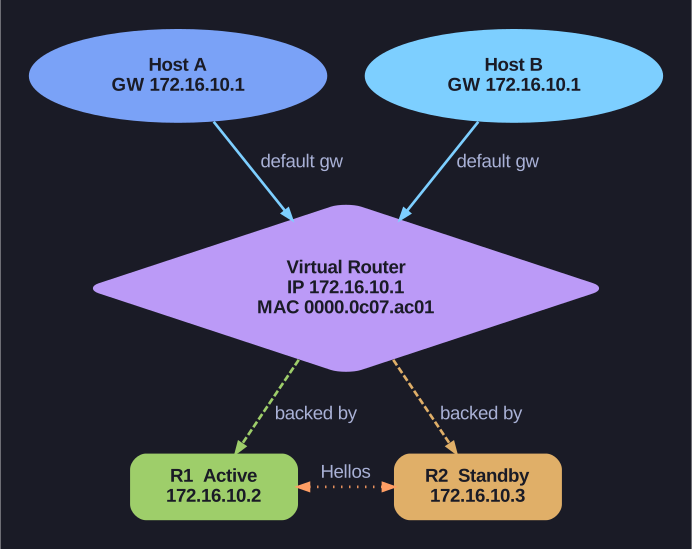
* Two routers presenting one virtual gateway. *
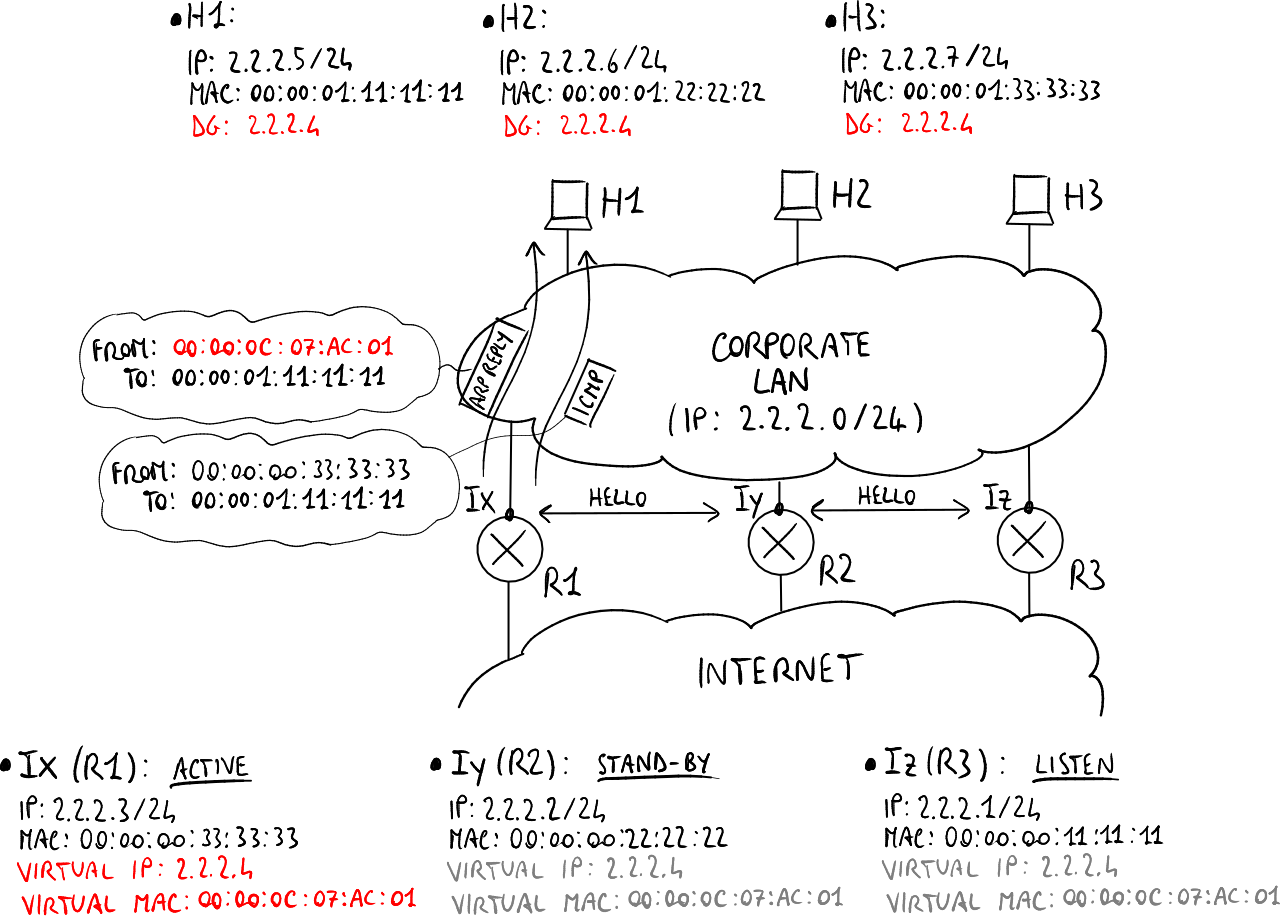
* Redundant routers backing one virtual router. — Luca Ghio, CC BY-SA 4.0, via Wikimedia Commons. *
How the virtual router works:
- The administrator configures a virtual IP address on the FHRP (First Hop Redundancy Protocol) group — this becomes the hosts' default gateway
- The FHRP protocol assigns a virtual MAC address to this virtual IP (derived from the group number for HSRP (Hot Standby Router Protocol))
- When hosts send an ARP request for the default gateway IP, the active router responds with the virtual MAC address
- All traffic from hosts is sent to the virtual MAC → the currently active physical router processes it
Why the virtual MAC matters:
- When failover occurs, the new active router takes over the virtual MAC
- Hosts' ARP caches still map the gateway IP to the virtual MAC → traffic automatically goes to the new active router
- No ARP cache timeout needed — failover is immediate from the hosts' perspective
Key terminology:
- Active router: The physical router currently forwarding traffic for the virtual router group
- Standby router: The physical router monitoring the active and ready to take over
- Virtual router: The logical entity (IP + MAC) that hosts see as their gateway
A protocol (HSRP, VRRP (Virtual Router Redundancy Protocol), or GLBP (Gateway Load Balancing Protocol)) determines which physical router takes the active role and when the forwarding must be handed over to the standby.
Go deeper:
- First-hop redundancy protocol (Wikipedia) — the shared virtual gateway address backed by multiple routers.
- Hot Standby Router Protocol (Wikipedia) — how the active router answers ARP/ND with the virtual MAC.
Note saved — thanks!