Question
What are the characteristics of a small network topology?
Answer
Small business networks are simple, usually have a single WAN connection (DSL/cable/Ethernet), and are run by a local or contracted IT person rather than a dedicated department.
Most businesses are small, so most business networks are small too. Because the scale is modest, the design stays simple: a single Wide Area Network (WAN) link reaches the internet through one Internet Service Provider (ISP), and a switch fans that connectivity out to end devices, with a wireless access point added for mobile clients. The defining contrast with a large enterprise is staffing — a large network needs a dedicated IT department to maintain, secure, and troubleshoot it, whereas a small network is typically handled by one local technician or an outside contractor. This matters because it shapes every later decision: device choices, redundancy, and monitoring all have to be manageable by one person on a limited budget.
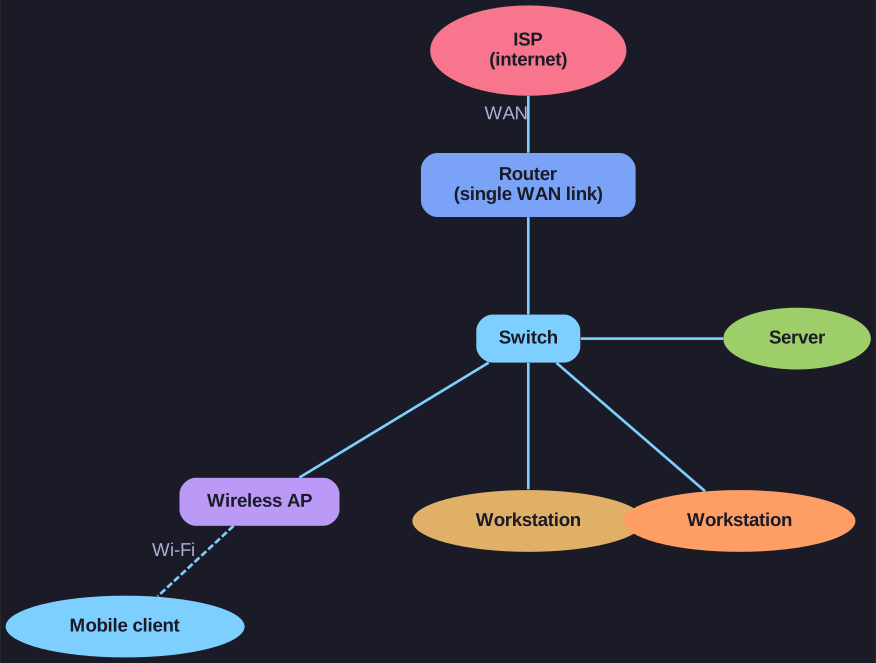
* A single WAN link to the ISP, a router, and one switch fanning out to wired hosts plus a wireless AP. *
Small Network Characteristics:
- The majority of businesses are small, so most business networks are also small
- A small network design is usually simple
- Small networks typically have a single WAN connection provided by DSL, cable, or an Ethernet connection
Management:
- Large networks require an IT department to maintain, secure, and troubleshoot devices and protect organizational data
- Small networks are managed by a local IT technician or a contracted professional
Typical Small Network Topology:
- Router connected to internet via ISP
- Switch connecting end devices
- Wireless access point for mobile devices
- Servers and workstations
Go deeper:
 Wikipedia — Network topology — physical vs logical layouts (the small network is a switched star) and the standard topology types.

Note saved — thanks!
Question
What factors should be considered when selecting network devices for a small network?
Answer
Cost, speed and types of ports/interfaces, expandability, and the operating system's features and services.
Even a small network deserves real planning, because the intermediary devices you buy — the routers, switches, and access points — are hard and expensive to swap once the network is running. Four factors drive the choice. Cost sets the ceiling on a small budget. Speed and the types of ports/interfaces decide whether the device can carry the traffic and physically connect what you have (enough Gigabit ports, the right fibre or copper interfaces). Expandability is about headroom: a fixed-port switch is cheaper but can't grow, whereas a modular one leaves room to add capacity as the business grows. And the device's operating system features and services determine what it can actually do — QoS, security, VPN, routing protocols. Weighing these up front is what stops a small network from hitting a wall the first time it needs to expand.
Factors to consider when selecting intermediary devices:
| Factor | Consideration |
|---|---|
| Cost | Budget constraints |
| Speed and types of ports/interfaces | Required bandwidth and connection types |
| Expandability | Room for growth |
| Operating system features and services | Required functionality |
Key insight: One of the first design considerations is the type of intermediary devices (routers, switches, access points) to use to support the network.
Go deeper:
- Wikipedia — Networking hardware — what routers, switches, and access points each do, so you can match device to role and budget.
Note saved — thanks!