Question
What are the four fundamental elements of any wireless network?
Answer
Every wireless network is built from four elements: wireless devices, base stations, wireless links, and network infrastructure.
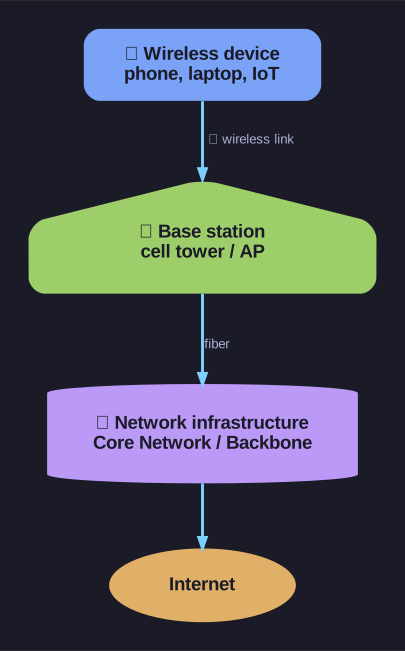
* The four elements: device, link, base station, infrastructure. *
1. Wireless Devices (Drahtlose Geräte):
- The end-user devices: smartphones, laptops, IoT sensors.
- These run the actual applications.
- Can be stationary or mobile. Important distinction: wireless does not automatically mean mobile. A desktop PC with a Wi-Fi adapter is wireless but not mobile.
2. Base Station (Basisstation):
- The bridge between the wireless world and the wired world.
- Examples: cell towers, Wi-Fi access points, WiMAX base stations.
- Connected to the wired network infrastructure via cable (usually fiber).
- Acts as a relay, forwarding packets between the wired network and wireless devices within its coverage area.
3. Wireless Link (Übertragungskanal):
- The radio connection between devices and the base station.
- A multiple access protocol coordinates which device gets to transmit when, since air is a shared medium.
- Different technologies offer different data rates and transmission distances.
4. Network Infrastructure (Netzwerkinfrastruktur):
- The wired backbone connecting base stations to each other and to the internet.
- In mobile networks, this is called the Core Network (Kernnetz).
- In wired internet, it's called the Backbone.
Tip: Think of it like a postal system. Devices are the people sending mail, the base station is the local post office, the wireless link is walking to the post office, and the network infrastructure is the postal truck network connecting all post offices.
Go deeper:
 Wireless network (Wikipedia) — how the device → link → base-station → backbone building blocks recur across PAN, LAN and cellular networks.

Note saved — thanks!
Question
What's the difference between "wireless" and "mobility"?
Answer
Wireless means communication without cables. Mobility means the device can move while maintaining its connection. These are two separate properties.
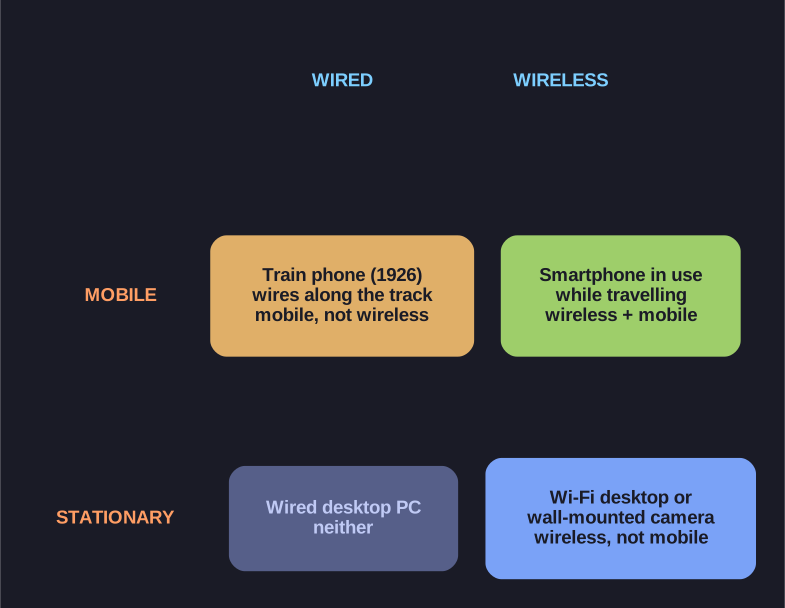
* The two properties are independent — a device can have either, both, or neither. *
Wireless without mobility:
- A desktop computer connected via Wi-Fi to a router. It communicates wirelessly but sits on a desk and never moves.
- A wireless security camera. No cables, but it's bolted to a wall.
Mobility without wireless (historically):
- The 1926 Hamburg-Berlin train telephone: passengers could call from a moving train, so the phone was mobile, but the actual signal travelled over wires running alongside the tracks rather than over the air.
Why this matters: When designing a wireless network, the challenges of wireless (shared medium, interference, spectrum limits) and the challenges of mobility (handover, location tracking, energy) are fundamentally different engineering problems. A system can face one, the other, or both.
Modern cellular networks tackle both simultaneously, which is why they're so complex. A home Wi-Fi network only really needs to solve the wireless challenges, not mobility.
Go deeper:
- Mobile computing (Wikipedia) — the mobility side as its own discipline: keeping a session alive as the device and its point of attachment change.

Note saved — thanks!