Question
What is SELinux and what does it protect?
Answer
SELinux is a kernel-level Mandatory Access Control (MAC) layer that confines every process to exactly the files, directories, and ports its policy allows — so even a compromised service can't reach anything it wasn't explicitly granted.
The point of SELinux is to add a second, non-bypassable layer underneath ordinary Linux permissions. Normal permissions (DAC) are set at the owner's discretion and root ignores them entirely; MAC is set centrally by policy and applies even to root processes. It works by labelling things — every process, file, and port carries a security context — and then a system-wide policy says which labelled process may touch which labelled resource. It's a whitelist / default-deny model: if no rule allows an action, it's denied. (Origin: the NSA's FLASK architecture.)
Key features:
- Controls access to files and resources at the most granular level
- Processes can only access resources defined by their policy or boolean settings
- Uses Mandatory Access Control (MAC) - object-based with strict rules
What SELinux labels:
- Programs (processes)
- Files (and directories)
- Network ports
Important: SELinux controls access permissions only, not content. It uses a whitelist approach - only explicitly allowed actions are permitted.
Go deeper:
 Security-Enhanced Linux (Wikipedia) — MAC, type enforcement, security contexts, and the FLASK origin.
- The SELinux Coloring Book (Red Hat, PDF) — an illustrated intro to type enforcement, MCS and MLS via a cats-and-dogs analogy.
Note saved — thanks!
Question
What are the three SELinux modes and when should each be used?
Answer
Enforcing = block AND log policy violations (production); Permissive = log violations but allow them through (for testing/troubleshooting); Disabled = SELinux off entirely (not recommended).
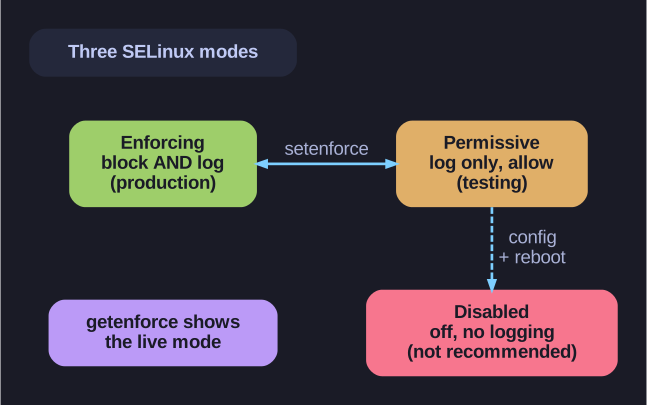
* The three SELinux modes — enforcing (block+log), permissive (log only), disabled (off). *
The key distinction is enforcing vs permissive: both still evaluate the policy and write the same AVC denial messages to the audit log, but only enforcing actually stops the action. That makes permissive the right tool for debugging — you can see every rule a workload would hit without breaking it, fix the labels/booleans, then switch back to enforcing. Check the live mode with getenforce; flip it at runtime with setenforce 0 (permissive) / setenforce 1 (enforcing). Note you cannot reach disabled with setenforce — going fully off requires editing the config file and rebooting.
| Mode | Behavior | Use Case |
|---|---|---|
| Enforcing | Enforces access control rules, denies violations | Production systems (default) |
| Permissive | Logs violations but doesn't block | Testing & troubleshooting |
| Disabled | Completely off, no logging | Not recommended! |
Check current mode:
getenforce
Change mode temporarily:
# Permissive
setenforce 0
# Enforcing
setenforce 1
Set mode at boot (kernel parameter):
# Permissive
enforcing=0
# Enforcing
enforcing=1
Tip: Never disable SELinux in production - use Permissive mode for troubleshooting instead.
Go deeper:
- getenforce(8) — the command that reports enforcing / permissive / disabled.
Note saved — thanks!