Question
What are the two main logging systems in modern Linux?
Answer
systemd-journald (binary, structured) and rsyslog (plain-text files in /var/log) — usually running side by side.
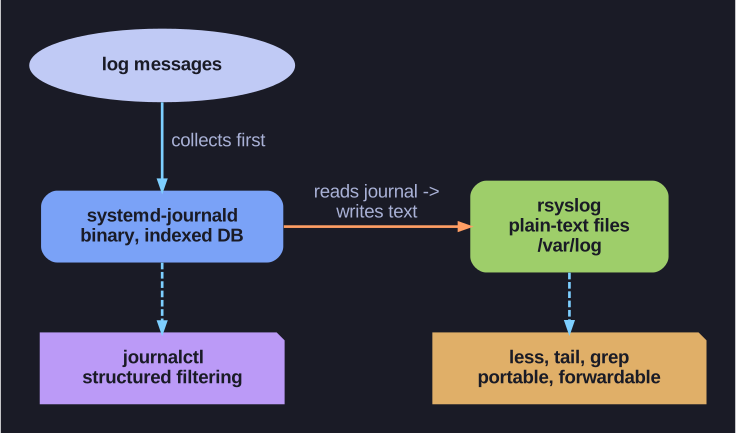
* journald collects into a binary indexed journal (queried with journalctl); rsyslog reads it and writes portable plain-text /var/log files — most systems run both. *
Linux has two parallel approaches to collecting log messages, and on a modern distro both are typically active at once:
| System | Storage | Format | Tool |
|---|---|---|---|
| systemd-journald | Binary database | Structured, indexed | journalctl |
| rsyslog | Text files in /var/log |
Plain text | less, tail, grep |
Why two systems? journald is the newer, central piece of systemd. Every message it receives is stored with rich metadata attached — timestamp, PID, the originating unit, the syslog priority — so you can filter precisely (journalctl -u sshd -p err) instead of grepping text. The trade-off: the journal is a binary database, so you can't cat it; you need journalctl.
How they cooperate: journald collects first. rsyslog then reads from the journal (or its own socket) and writes plain-text files like /var/log/messages. Those text files are easy to grep, tail, ship to a central log server, or feed to old tooling that predates systemd. So journald gives you structured querying; rsyslog gives you portable, greppable, forwardable text — and most systems keep both.
Tip: If cat-ing a log file gives binary garbage, you're looking at the journal — use journalctl instead.
Go deeper:
 systemd (Wikipedia) — journald as the append-only binary logging daemon, beside traditional syslog.
Note saved — thanks!
Question
What are the most important log files in /var/log?
Answer
messages (general), secure (auth/sudo), maillog, cron, boot.log — plus the binary journal under /var/log/journal/.
/var/log is the traditional home for plain-text system logs. Knowing which file holds what saves you grepping blindly when something breaks:
| File | Contents |
|---|---|
/var/log/messages |
General system messages (on Debian/Ubuntu this file is named syslog) |
/var/log/secure |
Authentication: logins, sudo, SSH (Debian/Ubuntu: auth.log) |
/var/log/boot.log |
Output from the boot process |
/var/log/maillog |
Mail server (MTA) activity |
/var/log/cron |
Scheduled-job execution |
/var/log/journal/ |
systemd-journald's binary database (not a text file) |
The split exists because different daemons are configured (via rsyslog rules) to route their messages to different files by facility — auth goes to secure, mail to maillog, and so on. That routing is what makes "check the right file first" possible.
Reading them:
less /var/log/messages      # page through general logs
tail -f /var/log/secure     # watch auth events live (e.g. during a login test)
Tip: Failed logins or sudo problems? Go straight to /var/log/secure (or journalctl _COMM=sshd).
Note saved — thanks!