Question
What is the Linux filesystem hierarchy and what is the root directory?
Answer
Linux arranges everything as one upside-down tree whose single root is /; every file and directory hangs somewhere beneath it.
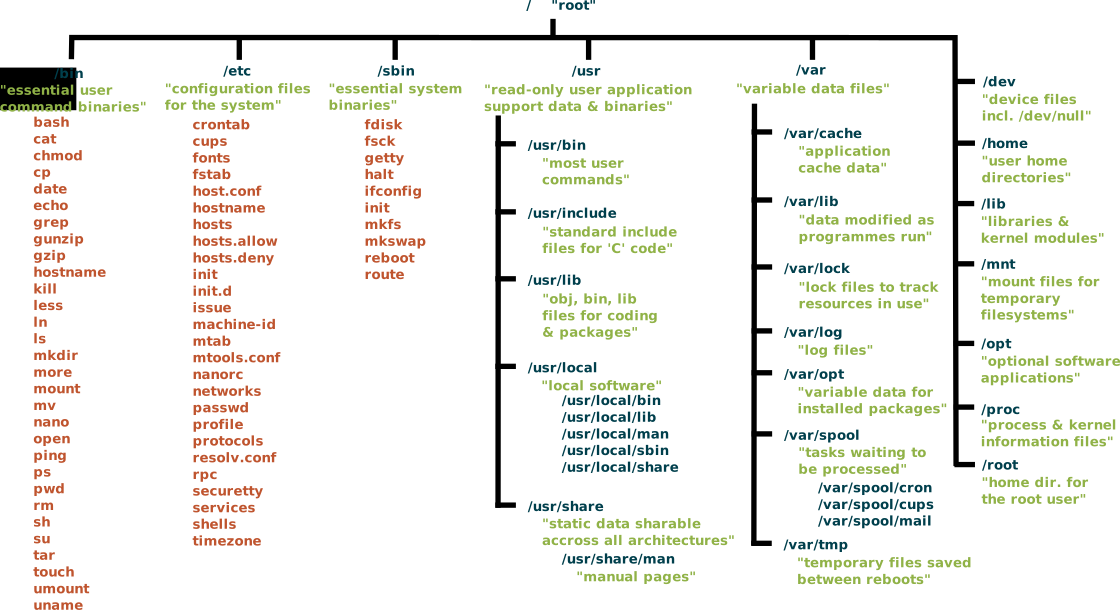
* The Linux filesystem as one inverted tree rooted at /, branching into /bin, /etc, /usr, /var, /home and the rest. — Ppgardne, CC BY-SA 4.0, via Wikimedia Commons. *
There is exactly one top, written / and called root. From there directories branch downward, and crucially there's no second tree: unlike Windows, Linux has no drive letters. A second disk, a USB stick, or a network share doesn't become D: — it gets mounted onto a directory inside the existing tree (say /mnt/usb), so its contents appear as just another branch.
This "single unified namespace" is a defining Linux idea. A program never has to ask "which drive?" — every path from / is unambiguous, and storage can be rearranged underneath without programs noticing.
Why "inverted"? Real trees have one root at the bottom and spread up; this tree has its one root at the top and spreads down. Picture / as the trunk of an upside-down tree and every directory as a branch growing downward from it.
Gotcha: don't confuse / (the root directory, top of the filesystem) with /root (just the home directory of the root user). Different things that happen to share the word "root."
Go deeper:
 Filesystem Hierarchy Standard 3.0 — the standards-body source defining the single-rooted
 /tree and every top-level directory.
Note saved — thanks!
Question
What is the difference between an absolute path and a relative path?
Answer
An absolute path starts at the root / and works from anywhere; a relative path starts from wherever you currently are.
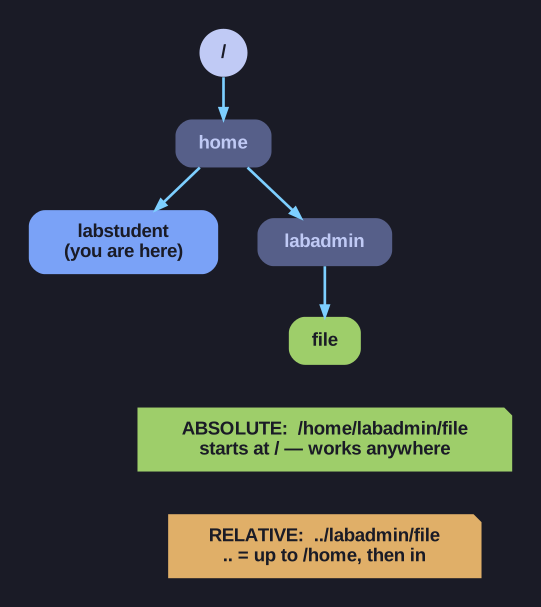
* Standing in labstudent, the same file is reached by an absolute path from / or a relative path through ... *
The single giveaway is the leading slash. If a path begins with /, the shell reads it from the top of the tree — unambiguous, location-independent. If it doesn't, the shell silently glues it onto your current directory, so the same text means different files depending on where you're standing.
| Type | Begins with | Example |
|---|---|---|
| Absolute | / |
/home/labstudent/file |
| Relative | a name, ., or .. |
../labadmin/file |
Three special references make relative paths powerful:
.— the current directory..— the parent directory (one level up)~— your home directory
Same target, two ways, standing in /home/labstudent:
cat /home/labadmin/file   # absolute: works from anywhere
cat ../labadmin/file      # relative: go up to /home, then into labadmin
When to use which: reach for absolute paths in scripts and config files, where you can't predict the working directory and a wrong guess is a bug. Reach for relative paths when typing interactively near your target — they're shorter and faster. The trade-off is robustness vs. brevity.
Note saved — thanks!