Question
What are input and output in Linux and how are they visualized in the terminal?
Answer
Input is what a program reads (usually keystrokes), output is what it writes back (usually to the screen) — by default both flow through the terminal.
Every interactive program sits between two streams: it reads input and writes output. In a terminal, the keyboard is the default source of input and the screen is the default destination for output, which is why typing and seeing results feels seamless.
read -p "What's your name? " name   # reads a line of input into $name
echo "Good day, $name"              # writes output back to the screen
Run it and you get:
What's your name? Florian
Good day, Florian
Why this matters: because input and output are just streams, not hard-wired to the keyboard and screen, you can later redirect them — feed a file in as input, or capture output into a file or another command. That decoupling is the whole foundation of redirection and pipes.
Tip: read -p prints the prompt and reads in one step; without -p you'd echo the prompt yourself.
Note saved — thanks!
Question
What are the three standard file descriptors in Linux and what are their numbers?
Answer
stdin = 0, stdout = 1, stderr = 2 — the three numbered streams every process gets for free.
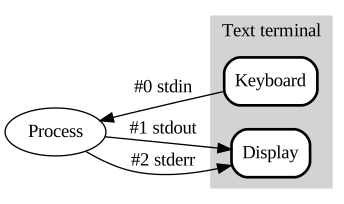
* Every process starts with three wired-up descriptors: 0 (stdin), 1 (stdout), 2 (stderr). — Danielpr85, Public domain, via Wikimedia Commons. *
A file descriptor (FD) is just a small integer the kernel uses as a handle to an open stream. Every process is born with three of them already wired up:
| FD | Name | Default | Purpose |
|---|---|---|---|
| 0 | stdin | keyboard | where the program reads input |
| 1 | stdout | terminal | normal results |
| 2 | stderr | terminal | error and diagnostic messages |
Why two output streams instead of one? Splitting normal output (stdout) from errors (stderr) lets you treat them differently: pipe the real results onward while letting errors still reach your screen, or capture errors to a logfile and discard the rest. If everything shared one stream you couldn't separate "the answer" from "something went wrong."
The descriptor numbers are what you put in redirection operators — 2> means "FD 2", i.e. stderr. Programs can also open extra files, which get the next free numbers (3, 4, 5...).
Mnemonic: "0-1-2 = In-Out-Error."
Go deeper:
 Standard streams — Wikipedia — stdin=0, stdout=1, stderr=2 and the file-descriptor concept.
Note saved — thanks!