Question
What are block devices in Linux and how are they named?
Answer
Block devices are storage hardware (disks, SSDs, cards) exposed as files under /dev/, named by how they connect — sd* for SATA/USB, vd* for VMs, nvme* for NVMe.
A block device moves data in fixed-size chunks (blocks), as opposed to a character device (like a keyboard) that streams byte by byte. Linux represents every disk as a special file in /dev/, so the kernel can talk to wildly different hardware through one uniform interface — and so you can manage it with ordinary tools once a filesystem is mounted on it.
The name encodes the transport, which is why it tells you something about the hardware:
| Connection | Pattern | Example |
|---|---|---|
| SATA / SAS / USB | /dev/sdX |
/dev/sda, /dev/sdb |
| virtio-blk (paravirtualized VM disk) | /dev/vdX |
/dev/vda, /dev/vdb |
| NVMe SSD | /dev/nvmeXnY |
/dev/nvme0n1 |
| SD / MMC / eMMC card | /dev/mmcblkX |
/dev/mmcblk0 |
The trailing letter counts whole disks (sda, sdb, …); a trailing number is a partition on that disk (sda1, sda2). NVMe is the odd one out: nvme0n1 means controller 0, namespace 1, and its partitions get a p: nvme0n1p2.
Why it matters: a /dev/sdX letter is assigned in detection order, so it can change between boots if you add or remove a disk. That is exactly why filesystems are mounted by stable UUID rather than by device name (see the UUID card).
Go deeper:
 Device file (Wikipedia) — the block vs character device distinction (buffered vs unbuffered) and the
 /devmodel.
Note saved — thanks!
Question
What is mounting in Linux, and why is there no "D: drive"?
Answer
Mounting attaches a filesystem onto a directory (the mount point) so its contents appear inside the single unified file tree — Linux has one tree starting at /, not separate drive letters.
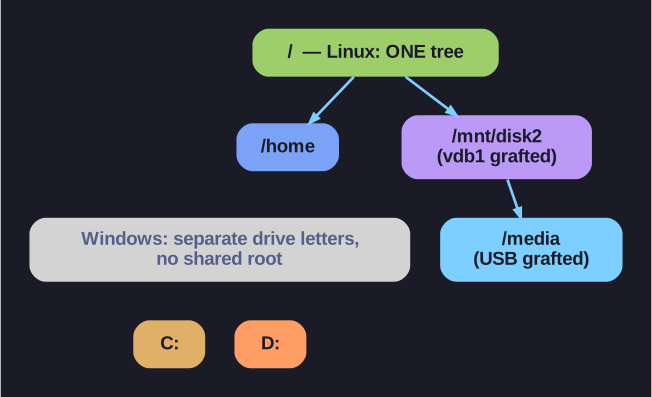
* Linux grafts every filesystem into one tree under /; Windows gives each its own drive letter. *
Windows gives each filesystem its own letter (C:, D:). Linux instead grafts every filesystem into one tree rooted at /. You pick an empty directory — the mount point — and mount makes the device's contents appear at that directory:
mount /dev/vdb1 /mnt/disk2 # now /mnt/disk2/... is the contents of vdb1
There are two halves to remember:
- Device — the block device holding the filesystem, e.g.
/dev/sda1. - Mount point — the directory it's attached to, e.g.
/mnt(the traditional scratch spot) or/media(for removable media).
The payoff is uniformity: an external USB disk, a network share, and the root filesystem are all just directories, so ls, cp, and mv work on all of them identically.
The gotcha: always umount before physically removing a device. Linux buffers writes in memory (write-back cache), so files may not actually be on the disk until the unmount flushes them. Pull the drive early and you can lose or corrupt data. If umount complains the device is busy, lsof /mnt/disk2 shows which process still has a file open there.
Go deeper:
- mount(8) man page — the
mountcommand, mount points, and how filesystems are grafted into the single tree.
Note saved — thanks!