Question
What is the shebang line and why is it important in shell scripts?
Answer
The shebang (#!/bin/bash) is the script's first line; it tells the kernel which interpreter to run the file with.
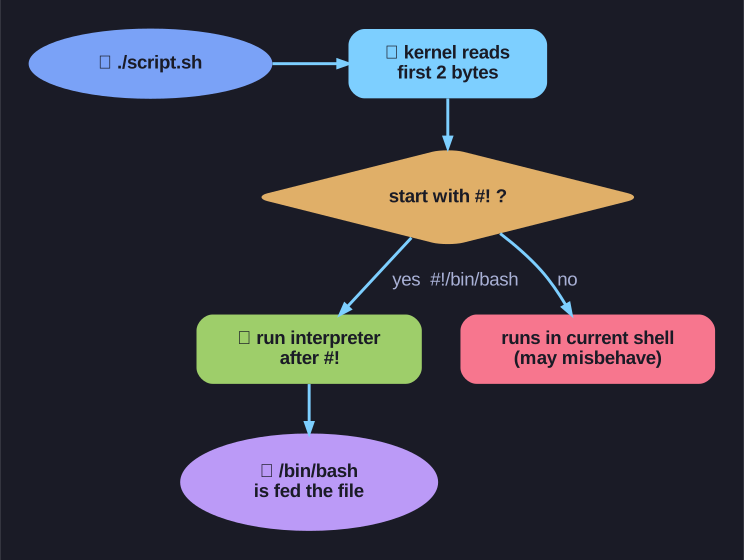
* How the kernel uses #! to pick the interpreter when you run a script. *
When you execute a script directly (./script.sh), the kernel reads the first two bytes. If they're #!, it runs the program named after them and feeds it the script. So #!/bin/bash means "run this file through /bin/bash." Without a shebang, the file is handed to whatever shell happens to be calling it — which may not be bash, so bash-specific syntax (arrays, [[ ]]) can mysteriously break.
Format:
#!/bin/bash
# Your script starts here
echo "Hello World"
Key points:
- Must be the very first line (no spaces before
#!) #!followed by the path to the interpreter- Without it, the script runs in the current shell (may behave differently)
Common shebangs:
| Shebang | Interpreter |
|---|---|
#!/bin/bash |
Bash shell |
#!/bin/sh |
Bourne shell (POSIX) |
#!/usr/bin/python3 |
Python 3 |
#!/usr/bin/env bash |
Bash (portable) |
Tip: Use #!/usr/bin/env bash for portability - it finds bash in the user's PATH.
Go deeper:
 Shebang (Unix) — Wikipedia — the
 #!interpreter directive's kernel mechanics, including theenvportability trick.
Note saved — thanks!
Question
How do you make a shell script executable and run it?
Answer
Two steps: chmod +x script.sh to grant execute permission, then ./script.sh to run it from the current directory.
A fresh script is just a text file — Linux won't run it until the execute bit is set, which is what chmod +x does. Then you launch it with ./script.sh. The ./ matters: the shell only auto-searches directories in $PATH, and your current directory normally isn't one of them (a deliberate security choice — otherwise a malicious ls dropped in a folder could hijack the real command). ./ says "the file is right here."
1. Make executable:
chmod +x myscript.sh
2. Run the script:
./myscript.sh              # From current directory
/home/user/myscript.sh     # Full path
bash myscript.sh           # Without execute permission
Why ./ is needed:
- Current directory is usually NOT in PATH
./explicitly means "current directory"
Alternative - add to PATH:
# Add script directory to PATH
export PATH="$PATH:$HOME/bin"
# Now you can run without path
myscript.sh
Tip: Store personal scripts in ~/bin and add it to your PATH.
Note saved — thanks!