Question
Why would a user OU be split into Privileged, Restricted and Service Accounts?
Answer
So that accounts with different risk get different policies and different handling: elevated accounts, ordinary users and non-human service accounts.
- Privileged: accounts with elevated rights, for example department heads or administrators. They deserve stricter policies (stronger authentication, tighter logon restrictions, more auditing) because their compromise hurts most.
- Restricted: ordinary employees with limited rights.
- Service Accounts: accounts that a service or application runs as, not a person. They often have long-lived passwords and broad rights, should not log on interactively, and need their own policies.
Separating them into OUs is what makes it possible to link a different GPO or delegate differently for each group of accounts.
Gotcha: the OU itself grants no rights. Putting a user into Privileged does not make them privileged; only group memberships and permissions do.
Go deeper:
 Microsoft Learn: Implementing least-privilege administrative models — why privileged accounts need separate handling.
- Wikipedia: Principle of least privilege — the principle behind separating account types.
Note saved — thanks!
Question
What is the difference between inherited and explicit permissions, and what does "Disable inheritance" do?
Answer
Inherited permissions flow down automatically from the parent folder; explicit permissions are set directly on the object. Disabling inheritance stops the flow, and you choose whether to keep the current entries as explicit copies or remove them.
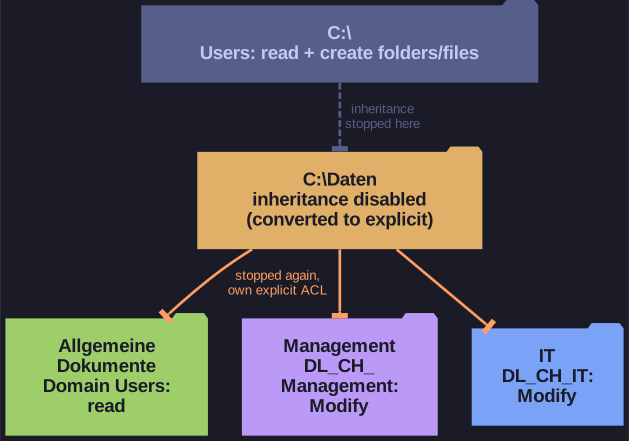
* Inheritance is broken at C:\Daten and again on each subfolder. *
By default a new folder inherits its parent's access list, so a change at the top propagates to everything below. That is convenient, but it means every subfolder gets the parent's broad rights too.
When you click Disable inheritance, Windows asks what to do with the inherited entries:
- Convert inherited permissions into explicit permissions: the same entries stay, but now belong to this folder and can be edited or deleted. This is the safe choice, since nothing changes until you edit.
- Remove all inherited permissions: the folder starts empty, which can lock everyone out, including admins.
Explicit entries take precedence over inherited ones. An explicit Allow beats an inherited Deny, while an explicit Deny beats an explicit Allow.
To give Management and IT their own access lists, inheritance must be broken on each subfolder, not only on C:\Daten.
Go deeper:
- Microsoft Learn: Best practices for NTFS permissions — explicit Allow beats inherited Deny, and when Deny is worth using.
Note saved — thanks!