Question
What is an intercepting proxy, and why is it a core tool of web-application security testing?
Answer
A tool that sits between your browser and the server as a proxy you control, so you can see — and pause, edit, or replay — every HTTP(S) request and response instead of only what the page chooses to show.
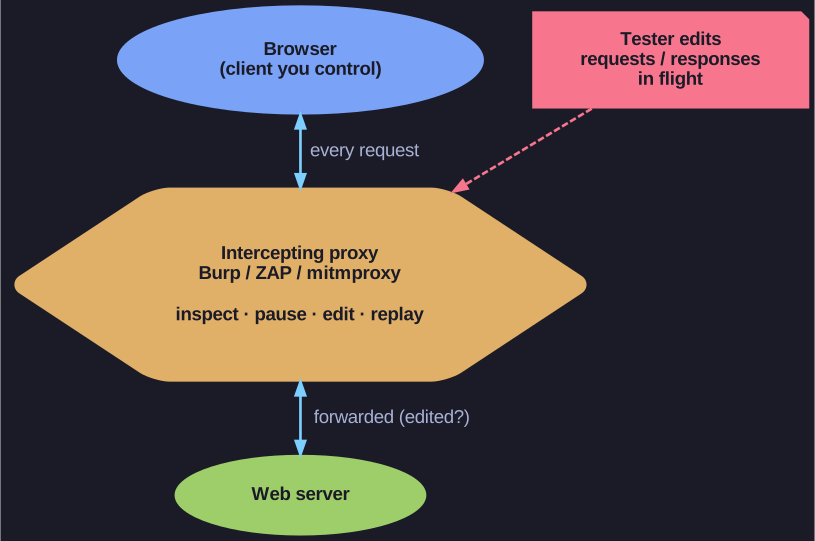
* All browser traffic routes through the proxy, giving the tester a live, editable view of every request and response. *
A browser normally hides the raw traffic: you see rendered pages, not the exact bytes on the wire. An intercepting proxy is configured as the browser's proxy, so all traffic flows through it and the tester gets a live, editable view:
- Inspect every request and response — headers, cookies, parameters, bodies.
- Intercept — hold a request before it reaches the server and change it (a price, a user ID, a hidden field) to see how the server reacts.
- Replay / fuzz — resend a captured request many times with altered values to hunt for injection, broken access-control, and logic flaws.
Common tools: Burp Suite, OWASP ZAP, mitmproxy, Fiddler.
Tip: The whole value is control of the client side. The server can't tell an edited request from a genuine one, so anything the browser was trusted to enforce (client-side validation, a hidden price) becomes yours to change.
Go deeper:
 Burp Proxy — PortSwigger documentation — the reference intercepting proxy: intercept, inspect, and modify traffic both ways.
 Proxy server (Wikipedia) — proxies in general, including intercepting/transparent variants.
- Burp Suite (Wikipedia) — the best-known web-app security testing suite built around this proxy.

Note saved — thanks!
Question
What happens during the TLS handshake (TLS 1.2 view), in four phases?
Answer
Phase A: negotiate security parameters. Phase B: server authentication + key exchange. Phase C: optional client authentication + key exchange completion. Phase D: switch on the cipher suite and finish.
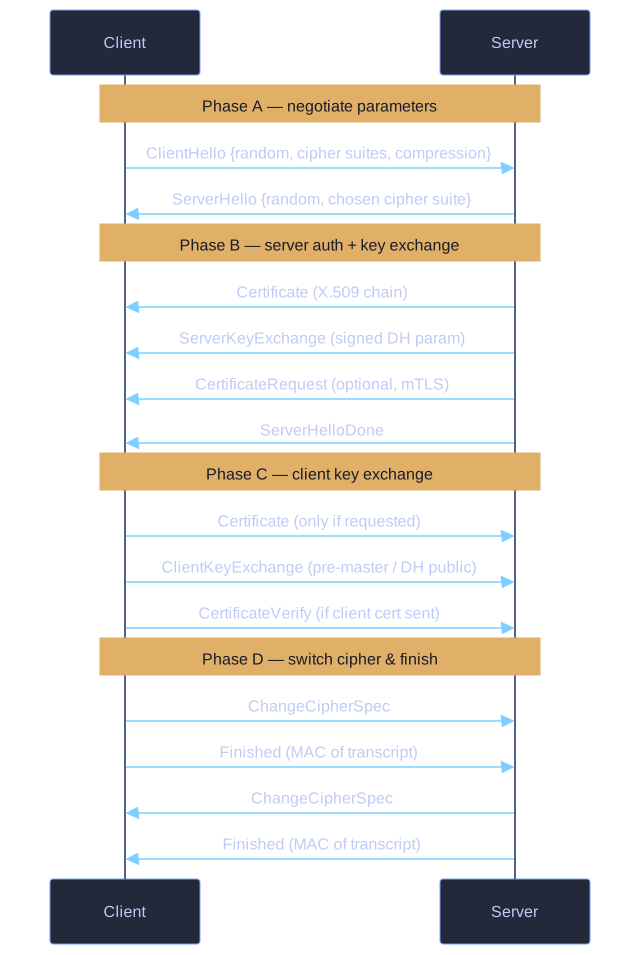
* The TLS 1.2 handshake in four phases — negotiate parameters, authenticate the server and exchange keys, complete the client key exchange, then switch on the cipher and verify the transcript. *
Phase A — Parameter negotiation:
Client → Server: ClientHello
   { random, session ID, supported cipher suites, supported compression }
Server → Client: ServerHello
   { random, session ID, chosen cipher suite }
Phase B — Server authentication & key exchange:
Server → Client: Certificate           (server's X.509 chain)
Server → Client: ServerKeyExchange     (e.g. DH public param, signed)
Server → Client: CertificateRequest    (optional, only for mTLS)
Server → Client: ServerHelloDone
Phase C — Client key exchange (and optional client cert):
Client → Server: Certificate           (only if requested, mTLS)
Client → Server: ClientKeyExchange     (RSA-encrypted pre-master OR client's DH public)
Client → Server: CertificateVerify     (only if client cert sent)
Both sides now derive the master secret from the pre-master + the two random nonces.
Phase D — Finalisation:
Client → Server: ChangeCipherSpec     (now using the new keys)
Client → Server: Finished              (encrypted MAC of all prior messages)
Server → Client: ChangeCipherSpec
Server → Client: Finished
The Finished messages are integrity-protected MACs over the entire handshake transcript — defeats downgrade attacks.
TLS 1.3 changes: combined Phases A+B into one round trip, removed RSA key exchange entirely (mandatory DHE/ECDHE for Perfect Forward Secrecy), removed CCS messages, removed weak cipher suites. Result: 1-RTT handshake (vs 2-RTT in 1.2), and resumed sessions are 0-RTT.
Tip: Use openssl s_client -connect host:443 -msg to see all handshake messages in hex. It's the most concrete way to understand what's actually happening.
Go deeper:
- Transport Layer Security (Wikipedia) — the handshake protocol and message flow.
- RFC 5246 — TLS Protocol Version 1.2 — the canonical spec defining exactly these handshake messages.
 The Illustrated TLS 1.2 Connection — a byte-by-byte annotated walkthrough of a real TLS 1.2 handshake.

Note saved — thanks!