Question
Why is the human ("the factor between screen and keyboard") described as both the biggest risk and the biggest protection in information security?
Answer
The same person who clicks the malicious link can also be the one who spots and stops the attack — so awareness decides which one they are.
Technology and processes can only go so far; a human ultimately decides whether to open the attachment, reuse the password, or question the suspicious call. That makes people:
- The biggest risk — they're convenient, can't oversee everything, dislike rules, want the newest thing, "know it all," and often only "learn by suffering."
- The biggest protection — an alert, trained employee catches what filters miss (a well-crafted spear-phish, a tailgater, a dodgy USB stick).
Why awareness is the lever: you can't patch a human, but you can train one. The whole point of awareness work is to move people from the risk column to the protection column.
Tip: Most real breaches start with a person, not an exploit — which is why "the human firewall" is a genuine control, not a slogan.
Go deeper:
 Identifying Social Engineering (Chaos Communication Camp, 2023) — how attackers target people instead of machines.
 CISA — Avoiding Social Engineering and Phishing Attacks — the defender's checklist for the human layer.
- Social engineering (security) — Wikipedia — the umbrella term for manipulating people into breaking security.

Note saved — thanks!
Question
How do the four main malware types — viruses, worms, trojans, and ransomware — differ from each other?
Answer
All are "software with harmful functions," but they differ in how they spread and what they do: a virus rides a host program, a worm spreads on its own, a trojan hides in a useful-looking app, and ransomware locks your data for money.
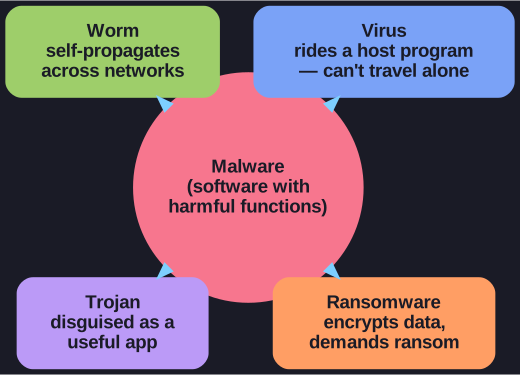
* All four are "malware," but each is defined by a different trait — how it travels or what it does. *
| Type | What it is | The distinguishing trait |
|---|---|---|
| Virus | Code that infects files and damages data (deletes work, photos, invoices) | Needs a host program to attach to and be carried along — it can't travel on its own |
| Worm | Self-propagating malware | Spreads without a host, copying itself across networks — which is how a single worm can paralyse worldwide networks |
| Trojan | Malware disguised as a harmless, useful application | Relies on deception: the user runs it willingly, while it secretly logs passwords, alters/deletes data, or eavesdrops via mic/webcam |
| Ransomware | Malware that encrypts your data or whole system | Adds an extortion step — it demands a ransom for the decryption key (which you may or may not actually get back) |
The unifying idea: the first three are mainly about how the code gets in and runs (carried, self-spreading, or tricked in), while ransomware is defined by its business model — denying you access to your own data and selling it back.
Tip: "Virus" gets used loosely for all malware, but precisely it's the one that needs a host. The category that matters most for awareness is the trojan, because it weaponises your trust — no exploit needed, just a convincing disguise.
Go deeper:
- Malware — Wikipedia — the parent category, with each type broken out.
- Ransomware — Wikipedia — the extortion-driven type covered in depth.

Note saved — thanks!