Question
After a Meterpreter session opens, what does the sysinfo command reveal, and what phase of an attack is this?
Answer
sysinfo prints the compromised machine's OS, architecture, hostname, domain, and logged-on user — the reconnaissance step of post-exploitation.
Post-exploitation is everything that happens after you've gained access — the goal shifts from "get in" to "understand, persist, and expand." sysinfo is usually the first move because the answers steer everything next:
- OS + architecture (x64/x86) → which further exploits and tools will run
- Domain → is this a standalone box or part of an Active Directory you can pivot through?
- Logged-on user / privileges → do you already have admin, or must you escalate?
It's the attacker's equivalent of "where am I and what am I working with?"
Tip: Recon doesn't stop at the perimeter — the first thing a smart intruder does inside is look around.
Note saved — thanks!
Question
What is Dynamic ARP Inspection (DAI), and how does it prevent ARP poisoning?
Answer
A switch feature that validates ARP packets against a trusted DHCP-snooping database — forged ARPs are dropped before reaching victims.
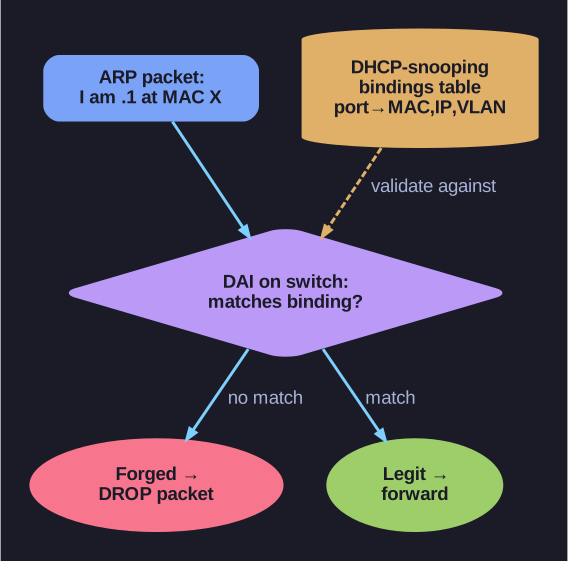
* DAI validates every ARP against the DHCP-snooping bindings table. *
The setup:
DAI requires a trusted bindings table that maps:
(switch port) → (MAC, IP, VLAN) — the legit owner
Built two ways:
- DHCP snooping — switch watches DHCP exchanges and records "this port got this IP"
- Static ARP entries — admin manually configures critical mappings (servers, gateways)
How DAI catches poisoning:
Every ARP packet on the network is inspected. If a frame says "I'm 192.168.1.1 at MAC X" but:
- The DHCP database shows that IP belongs to a different port → drop
- The MAC in the ARP packet doesn't match the source MAC of the Ethernet frame → drop
- The port the ARP came from isn't authorized → drop
A concrete example:
The ZyXEL USG20 router has DAI built in — when you ARP-poison, the router detects it, drops the forged packets, and even sends ICMP Redirect messages telling the victim to ignore the spoof.
Web-GUI of ZyXEL with log entry: "ARP spoofing detected"
Where to enable DAI:
| Vendor | Command/Feature |
|---|---|
| Cisco IOS | ip arp inspection vlan X |
| Juniper | set protocols arp-inspection |
| HP/Aruba | arp inspection vlan X |
| Many SOHO routers | Often called "ARP attack defense" or "Anti-spoofing" |
Why enterprises love DAI:
- Transparent to clients — no agent needed
- Catches the attack at the network edge
- Combined with port security (limit MAC count per port) it locks the LAN down
Limits:
- Doesn't protect against attacks where attacker controls a legit DHCP-assigned port
- Doesn't help on networks without DHCP snooping (e.g., static IP networks)
- WiFi has different mechanisms (WPA enterprise, client isolation)
Tip: Home routers usually don't have DAI. Public WiFi certainly doesn't. So if you're on coffee-shop WiFi, assume ARP poisoning is feasible — use a VPN.
Go deeper:
 DHCP snooping (Wikipedia) — the trusted IP/MAC/port bindings table DAI validates each ARP packet against.
- ARP spoofing (Wikipedia) — the switch-side mitigations in the broader defense landscape.

Note saved — thanks!