Question
What is ARP (Address Resolution Protocol), and what fundamental problem in networking does it solve?
Answer
ARP maps IP addresses to MAC addresses within a LAN — without it, you can't actually deliver a packet to a physical machine even if you know its IP.
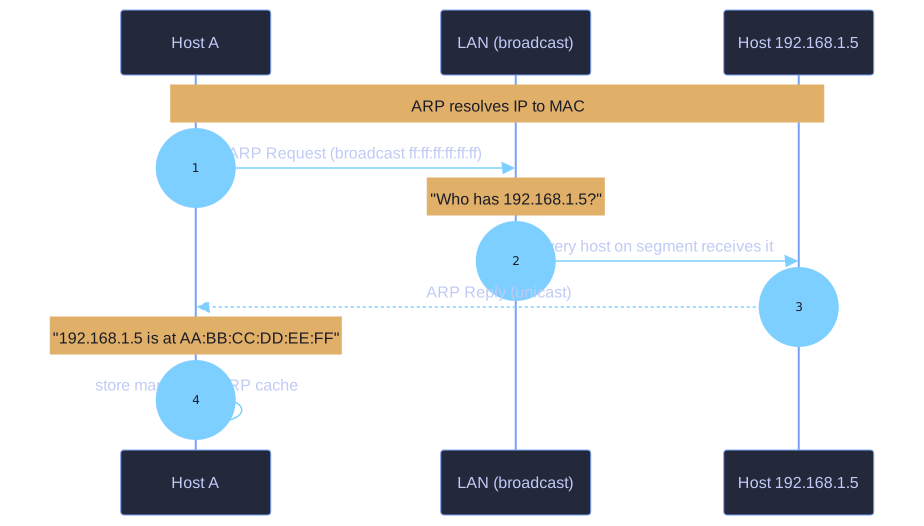
* ARP resolves IP→MAC: broadcast the question, unicast the reply, cache it. *
The core problem:
- The network you're talking on (Ethernet, WiFi) speaks MAC addresses (Layer 2)
- The applications you run speak IP addresses (Layer 3)
- When you want to send
192.168.1.5something, the NIC needs to know: which MAC address does that correspond to?
How ARP solves it:
- Host wants to send to
192.168.1.5— checks its ARP cache - Cache miss → sends an ARP Request as a broadcast: "Who has 192.168.1.5?"
- The host with that IP replies with its MAC: "192.168.1.5 is at AA:BB:CC:DD:EE:FF"
- Sender stores the mapping in its ARP cache for future use
Why it's needed only on a LAN:
- ARP only works within a single broadcast domain (LAN segment)
- For traffic going to other networks, the host ARPs for the default gateway's MAC instead — the gateway then handles the rest of the journey via routing
Inspect/clear the ARP cache:
arp -a       # view ARP table (Windows/Linux)
arp -d       # delete entries (Windows, requires admin)
ip neigh     # modern Linux equivalent
Tip: The classic "Layer 2 vs Layer 3" confusion clears up if you remember: routers operate on IP, switches operate on MAC. ARP is the bridge between them.
Go deeper:
 Address Resolution Protocol (Wikipedia) — full packet-format breakdown, ARP cache behaviour, and the spoofing attacks built on it.
- RFC 826 — An Ethernet Address Resolution Protocol — the original 1982 spec; short enough to read end-to-end and see exactly why the target-MAC field starts empty.

Note saved — thanks!
Question
When you ping a server on the internet, why does ARP resolve the default gateway's MAC and not the server's MAC?
Answer
Because Ethernet only delivers within the local LAN. To leave the LAN, your packet must first reach the gateway — so the gateway's MAC is what the Ethernet frame needs.
The journey of a packet:
- App: "Send this to
8.8.8.8" - OS routing table: "8.8.8.8 isn't on my LAN → use default gateway 192.168.1.1"
- ARP: "What's the MAC of 192.168.1.1?" → e.g.
AA:BB:CC:11:22:33 - Frame is built: dest MAC = gateway, dest IP = 8.8.8.8
- Gateway receives the frame, strips the Ethernet header, looks at the IP, forwards toward the next hop
Layered addressing:
| Layer | What it knows |
|---|---|
| Ethernet (L2) | "Deliver this frame to the next physical device" |
| IP (L3) | "Deliver this packet to the final destination" |
So the IP destination stays 8.8.8.8 end-to-end, but the MAC destination changes at every hop (your PC → router → ISP router → … → Google's server).
Implication for the ARP cache:
For internet-bound traffic, you'll never see the destination server's MAC in your ARP cache — you'll always see your default gateway's MAC. This is how you can verify "is the destination on my LAN or outside it?"
Tip: This is why misconfiguring the default gateway breaks all internet access immediately — without a known gateway MAC, no packet can leave the LAN.
Note saved — thanks!