Question
What's a typical firewall deployment scenario for an SMB — what zones exist, what's in each, and why does this matter?
Answer
This scenario models a small-medium business (KMU): 3 zones — DMZ (public web server), Inside (file server + employee laptops), Outside (Internet) — all separated by a single zone-based firewall. The zoning idea is vendor-independent: this lab happens to use a Palo Alto PA-440 as its example device, but the same three-zone design applies to any zone-based firewall (Fortinet FortiGate, Cisco, pfSense, etc.) — an SMB does NOT need this specific model. Notably, the Inside zone holds two different subnets (a server subnet and a staff subnet) in the SAME zone, demonstrating that one zone can span multiple subnets.
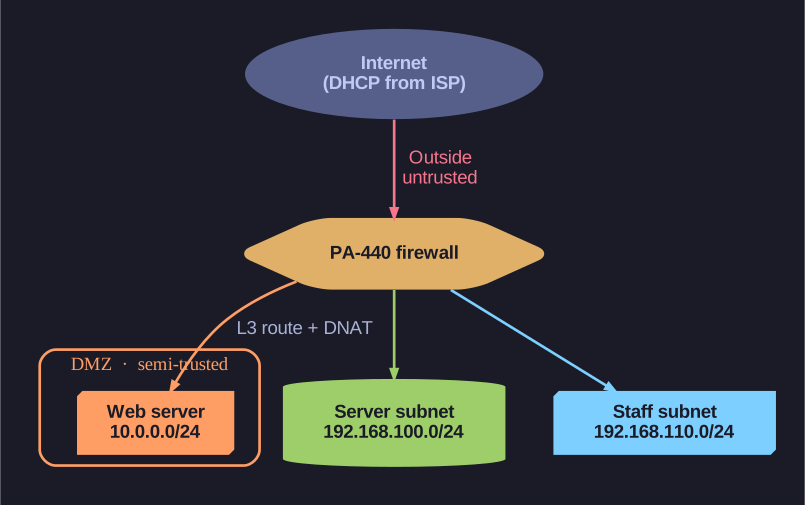
* Zone topology — the Inside zone spans two subnets. *
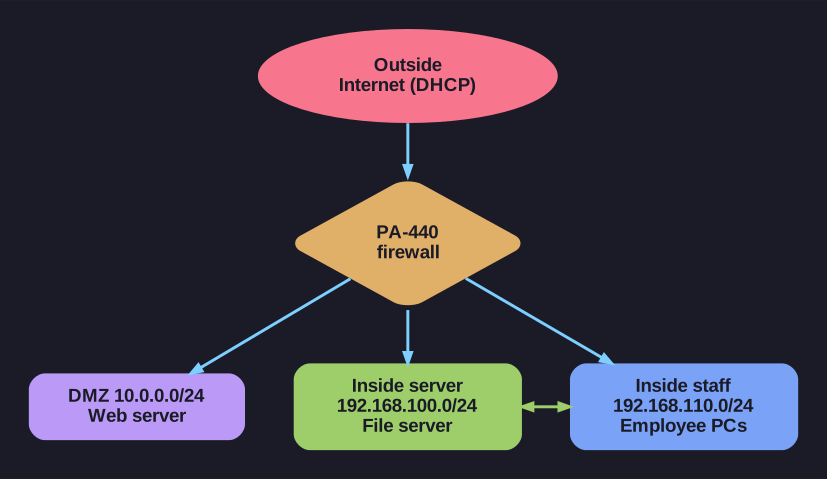
* A 3-zone topology — two Inside subnets share one zone. *
The three zones and what they hold:
| Zone | Subnet(s) | Devices | Trust level |
|---|---|---|---|
| DMZ | 10.0.0.0/24 | Web server | Semi-trusted (publicly reachable) |
| Inside | 192.168.100.0/24 (server) + 192.168.110.0/24 (staff) | File server, employee PCs | Trusted |
| Outside | DHCP from ISP | Internet client | Untrusted |
The firewall ships with two zones pre-configured (trust/Inside and untrust/Outside); here you rename them to match the scheme and add the third zone (DMZ).
The threat model embedded in this design:
- Web server breached? Attacker is in DMZ — not the internal LAN. File server still protected. Note that the DMZ is "completely walled off": every connection in or out needs an explicit rule.
- Internet scan? Only sees what's explicitly published (the web server via DNAT). Internal subnets are unreachable.
The key teaching point — two subnets, one zone:
The file server (192.168.100.0/24) and the employee PCs (192.168.110.0/24) live in different subnets but the same Inside zone. This is deliberate: it shows that a zone is a trust grouping, not a network identifier:
"Fileserver und die Mitarbeiter-PCs sind zwar in derselben Zone, das schliesst jedoch nicht aus, zwei Subnetze zu erstellen."
Two internal networks (e.g. different departments) that need the same protection level can share one zone — which means you don't write separate rule sets for each.
Tip: Compare this to a flat home network where everything sits in one 192.168.1.0/24. This segmented design (separate DMZ, internal subnets, and an untrusted Outside) is what entry-level enterprise segmentation looks like, even at SMB scale.
Go deeper:
 Network segmentation (Wikipedia) — why splitting a network into trust-based zones/subnets (DMZ, internal, untrusted Outside) limits an attacker's reach and is the security rationale behind this design.
Note saved — thanks!
Question
What is a firewall zone, and why can multiple subnets live in the same zone?
Answer
A zone is a logical grouping of interfaces or networks that share similar security requirements and trust levels. Multiple subnets can share a zone when they need the same security policy — the zone is the policy-attachment point, not a network identifier.
The official definition:
"Zonen in einer Firewall-Konfiguration sind logische Gruppierungen von Schnittstellen oder Netzen, die ähnliche Sicherheitsanforderungen und Vertrauensniveaus haben."
Why zones beat per-subnet rules:
Without zones (per-subnet rules):
  192.168.10.0/24 → 10.0.0.0/24:  allow http
  192.168.20.0/24 → 10.0.0.0/24:  allow http
  192.168.30.0/24 → 10.0.0.0/24:  allow http
  ... 50 more lines as company grows

With zones:
  Inside → DMZ:  allow http
  (any subnet you add to "Inside" inherits the rule automatically)
The Fileserver + Mitarbeiter-PCs case (a worked example):
Here the file server (192.168.100.0/24) and the employee PCs (192.168.110.0/24) are placed in the same Inside zone, even though they're different subnets. This exact case illustrates the principle — two networks with similar protection needs share a zone, so you don't write separate rule sets for each:
| Same zone makes sense when | Different zones make sense when |
|---|---|
| Both subnets need same internet access rights | Different access rights to Internet/each other |
| Same level of monitoring | Different monitoring intensity |
| Managed by same admin team | Different policy ownership |
Zone-based vs interface-based (older model):
Older firewalls (and Cisco IOS ACLs) tied rules to interfaces. Modern zone-based firewalls (Palo Alto, Fortinet, Cisco ZBF) decouple the rule from the physical interface — you can re-cable, add interfaces, virtualize, without touching rules.
Tip: The mental shortcut: a zone is "who you are from a security standpoint." Two subnets are the same zone if they're treated as the same kind of citizen by your security policy.
Go deeper:
- Configure Interfaces and Zones (Palo Alto PAN-OS) — the canonical docs: an NGFW won't process traffic on any interface until it's bound to a security zone, and policy attaches to zones, not interfaces.
Note saved — thanks!