Question
What is TLS Decryption (SSL Forward Proxy) on a firewall, and why is it useful?
Answer
TLS Decryption is a "controlled MITM": the firewall terminates the client's TLS session, inspects the plaintext, then re-encrypts to the real server.
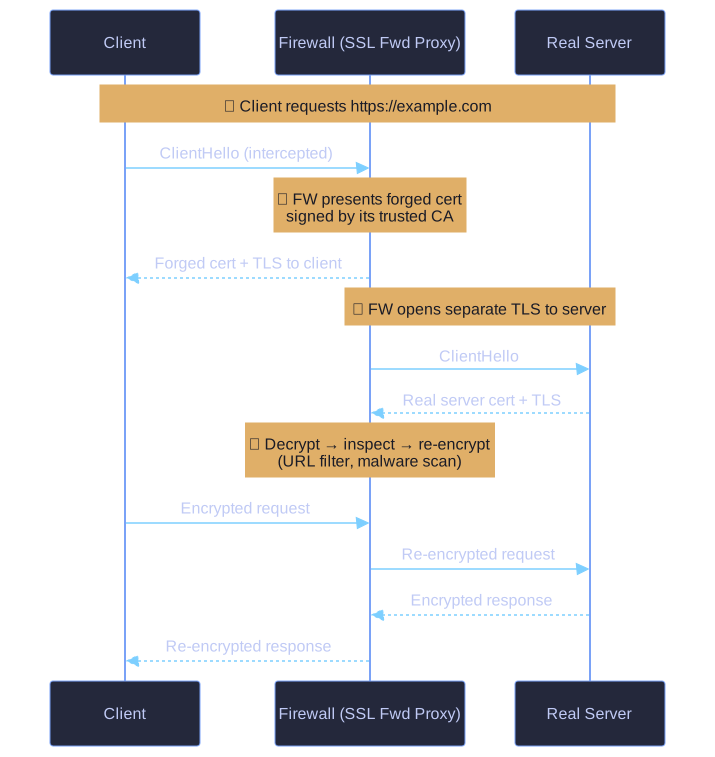
* SSL Forward Proxy as a controlled MITM: decrypt-inspect-re-encrypt. *
Without it, the firewall sees only encrypted bytes for HTTPS traffic — it cannot do URL filtering, malware scanning, or content inspection on encrypted payloads. With SSL Forward Proxy, the FW becomes the man-in-the-middle on purpose.
How it works:
- Client requests
https://example.com. - Firewall intercepts, presents its own certificate to the client (signed by a CA the client trusts).
- Firewall opens a separate TLS session to the real server.
- FW decrypts → inspects → re-encrypts in both directions.
Why "controlled MITM":
- An attacker doing this would be malicious — but here, the organization owns the FW and installed its CA on every client device, so the client trusts it.
- Same cryptographic technique as a real attack — only the trust relationship makes it legitimate.
Tip: SSL Forward Proxy = legal MITM. Same break-and-inspect mechanism as mitmproxy/Burp Suite, just at the perimeter.
Go deeper:
 TLS termination proxy (Wikipedia) — explains the forward-proxy MITM pattern: a private CA installed on clients lets the proxy mint per-server certs on the fly.

Note saved — thanks!
Question
Why must the firewall's root certificate be installed on every client device when SSL Forward Proxy is enabled?
Answer
Without the root cert in the client's trust store, every HTTPS site triggers a certificate warning ("Not Secure / Untrusted CA").
When the FW intercepts TLS, it forges a certificate for the requested domain and signs it with its own internal CA. The browser checks: "Do I trust the signer?" If the FW's CA isn't in the OS/browser trust store, the answer is no — and the browser refuses or warns.
Practical consequences:
- Corporate-managed devices: cert pushed via GPO/MDM — invisible to user.
- BYOD or guest devices: bypass needed (e.g., decryption-exclusion list) or HTTPS breaks.
- Cert pinning (banking apps, some browsers for Google domains): even with the root cert installed, pinned apps reject the FW cert and break. → exclude from decryption.
Tip: Pinning beats any FW root cert. If TLS decryption breaks an app for no obvious reason, suspect cert pinning first.
Note saved — thanks!