Why does the browser show a big certificate warning when traffic first runs through mitmproxy, and how does making mitmproxy a subordinate CA of the company PKI remove it?
At first mitmproxy signs its fake site certificates with its own self-made CA, which the client does not trust; once mitmproxy's CA is a sub-CA chaining to the company root, the fakes validate and the warning disappears.
To read HTTPS, mitmproxy must terminate TLS itself: it presents a certificate for, say, meteo.ch to the browser. It cannot have the real one (that private key is on the real server), so it generates a certificate on the fly for each requested host name, signed by its CA. Out of the box that CA is self-generated, unknown to every trust store, so the browser rightly raises NET::ERR_CERT_AUTHORITY_INVALID and HSTS-protected sites cannot be opened at all.
The lab then has the proxy request a certificate from the company CA using the Subordinate Certification Authority template:
openssl req -new -newkey rsa:4096 -keyout mitmproxyca-private.key -out subca.csr- Submit the CSR on
/certsrvwith the Subordinate CA template, download the chain. - Convert the
.p7bto PEM into~/.mitmproxy/mitmproxy-ca.pemand append the private key to the same file, since mitmproxy needs the key to sign the certificates it generates. - Start with
--set cert_passphrase=…to unlock the key.
Now every certificate mitmproxy generates chains: fake leaf, then mitmproxy sub-CA, then CKTECK CA, then the root, which domain clients trust. The padlock reappears. This is exactly how corporate TLS-inspection firewalls work, and why a sub-CA certificate must never be issued lightly: it is a licence to impersonate any website.
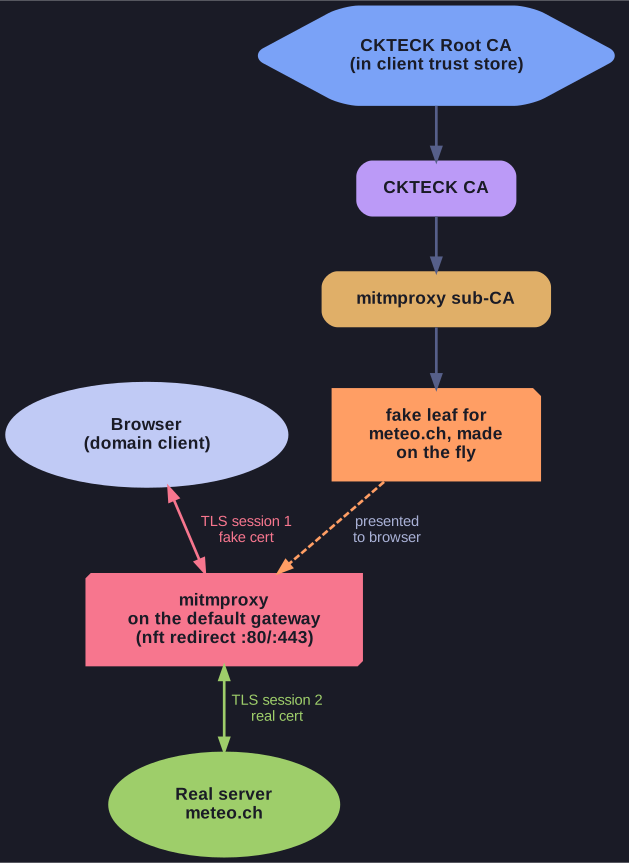
* Two TLS sessions; the browser trusts the forged certificate through the company root. *
Go deeper:
 mitmproxy docs: How mitmproxy works — on-the-fly certificate generation, SNI and the transparent HTTPS flow in detail.
- CISA: HTTPS Interception Weakens TLS Security — the risks of inspection products that re-sign traffic.