Quiz Entry - updated: 2026.09.29
Why do SYSVOL and NETLOGON appear as shares on a domain controller, and what are they for?
They are the shares every domain controller provides automatically: SYSVOL holds the Group Policy files and scripts that clients download, and NETLOGON holds logon scripts.
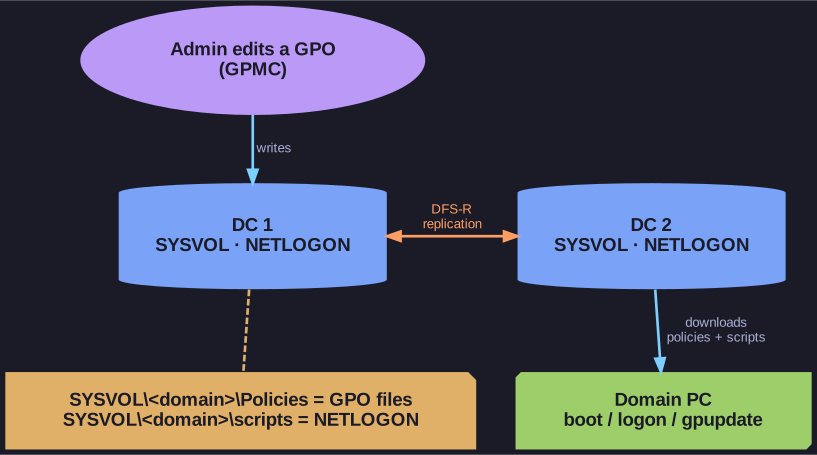
* Every DC holds a replicated SYSVOL; clients fetch their policies from it. *
- SYSVOL (
C:\Windows\SYSVOL\sysvol): contains the file part of every GPO (the policy templates and settings) and scripts. It is replicated between all domain controllers (via DFS-R), so a client can fetch its policies from whichever DC answers. This is where the settings fromgpupdateactually come from. - NETLOGON: a share pointing into SYSVOL's scripts folder. It is where classic logon scripts live, kept for compatibility with older clients.
They appear in the server's share list because the server is a domain controller. On a member server they would not exist, and if they are missing on a DC, clients cannot apply Group Policy.
Go deeper:
 Microsoft Learn: Active Directory SYSVOL and NETLOGON — what the Policies and scripts folders hold and how SYSVOL replicates.
- Microsoft Learn: Missing SYSVOL and NETLOGON shares — what breaks when they are gone.