What is User Account Control (UAC), and what does "Admin Approval Mode" mean?
UAC makes even administrators run programs with standard-user rights by default; a task only gets full admin rights after an explicit approval (consent or credentials). Admin Approval Mode is this behaviour applied to administrator accounts.
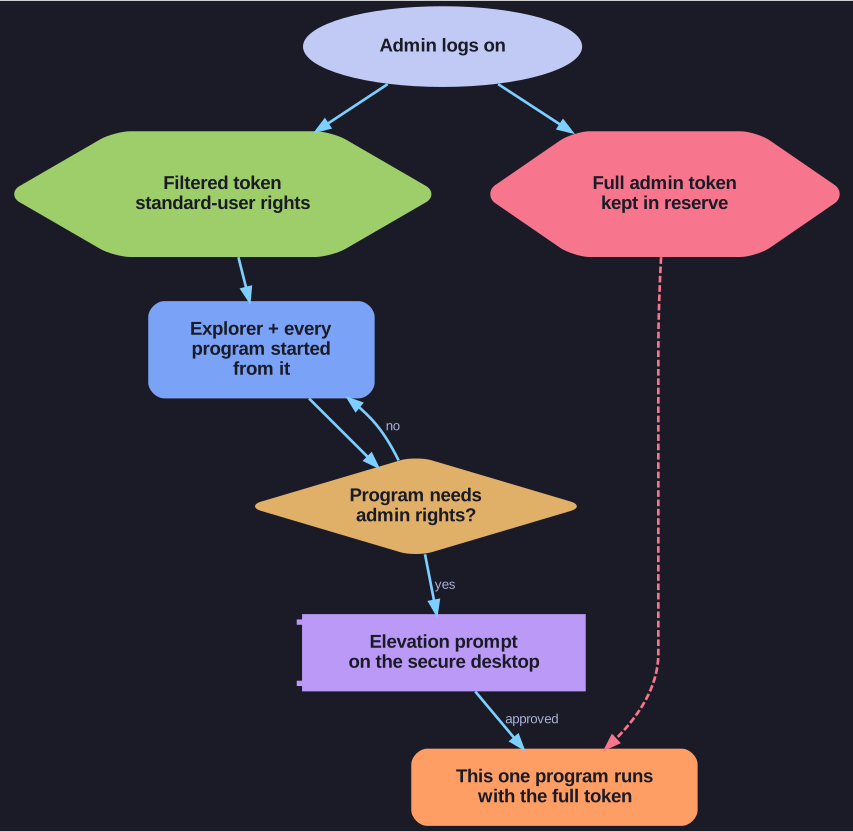
* Two tokens at logon; the full one is used only after an approved prompt. *
When an administrator logs on with UAC enabled, Windows creates two tokens: a filtered standard-user token and the full administrator token. Explorer and everything started from it run with the filtered token. When a program needs admin rights, UAC shows an elevation prompt, and only after approval does that one program get the full token.
Why this helps: malware started by an admin, or a malicious script in a browser, does not silently inherit admin rights. It hits the prompt, and the user gets a chance to notice. It also nudges people to work as standard users.
Admin Approval Mode is the name of this split-token mode for admins. The built-in Administrator account is normally exempt (it always runs with full rights), which is why a hardening policy explicitly enables Admin Approval Mode for it too.
Go deeper:
 Microsoft Learn: How User Account Control works — split tokens, the elevation prompt and the secure desktop.
- Wikipedia: User Account Control — history since Vista and known bypass classes.