What is the difference between inherited and explicit permissions, and what does "Disable inheritance" do?
Inherited permissions flow down automatically from the parent folder; explicit permissions are set directly on the object. Disabling inheritance stops the flow, and you choose whether to keep the current entries as explicit copies or remove them.
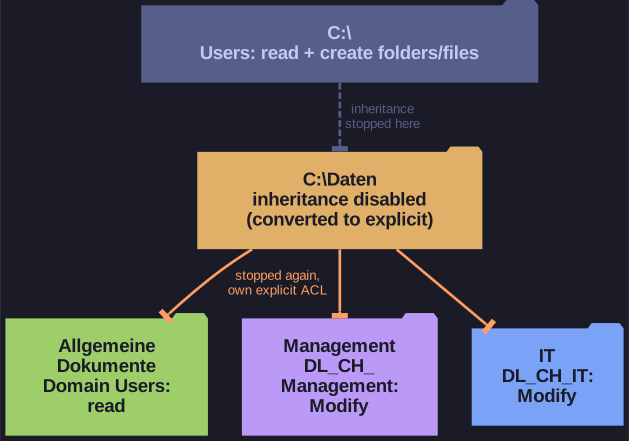
* Inheritance is broken at C:\Daten and again on each subfolder. *
By default a new folder inherits its parent's access list, so a change at the top propagates to everything below. That is convenient, but it means every subfolder gets the parent's broad rights too.
When you click Disable inheritance, Windows asks what to do with the inherited entries:
- Convert inherited permissions into explicit permissions: the same entries stay, but now belong to this folder and can be edited or deleted. This is the safe choice, since nothing changes until you edit.
- Remove all inherited permissions: the folder starts empty, which can lock everyone out, including admins.
Explicit entries take precedence over inherited ones. An explicit Allow beats an inherited Deny, while an explicit Deny beats an explicit Allow.
To give Management and IT their own access lists, inheritance must be broken on each subfolder, not only on C:\Daten.
Go deeper:
 Microsoft Learn: Best practices for NTFS permissions — explicit Allow beats inherited Deny, and when Deny is worth using.