What is a Group Policy Object (GPO), and when do its settings take effect?
A GPO is a named bundle of settings (computer part and user part) that is linked to a site, domain or OU and then applied automatically to all computers and users inside it.
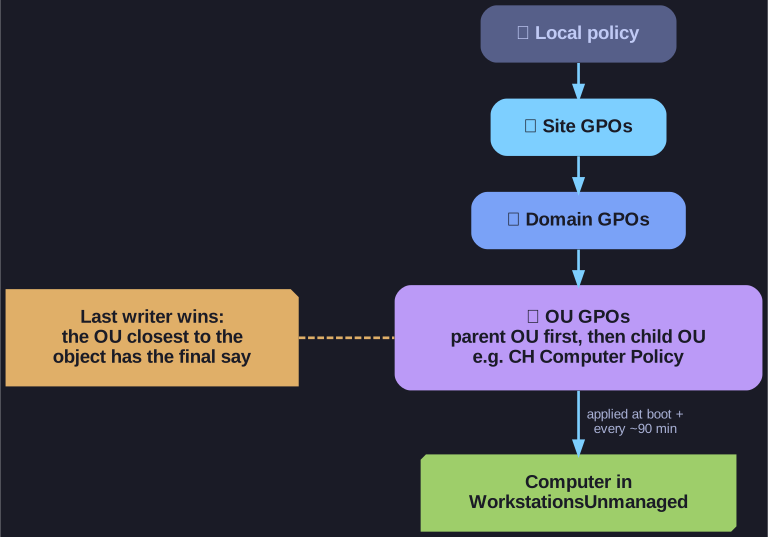
* LSDOU: the policy applied last wins a conflict. *
Instead of configuring each PC by hand, you define the setting once (password rules, firewall, who is local admin, drive mappings, …) and link the GPO to where the objects live. It has two halves:
- Computer Configuration: applied to the machine, at boot and on background refresh.
- User Configuration: applied to the user, at logon and on background refresh.
Changes are not instant. Clients pull policies at startup/logon and then roughly every 90 minutes (with a random offset). To apply them now, run gpupdate on the client, or gpupdate /force to reapply every setting, not just changed ones. Some computer settings still need a reboot.
When several GPOs apply, they are processed in the order Local, Site, Domain, OU (LSDOU); the one processed last wins a conflict, so the OU closest to the object has the final say.
Go deeper:
 Microsoft Learn: Group Policy processing — LSDOU, refresh intervals, Enforced and Block Inheritance.
 Microsoft Learn: gpupdate — all switches, including
 /forceand/boot.- Wikipedia: Group Policy — overview of what Group Policy can configure.