What does the sticky bit do, and why is it set on /tmp?
In a directory with the sticky bit, only a file's owner (or the directory's owner, or root) can delete or rename it, even if everyone can write to the directory.
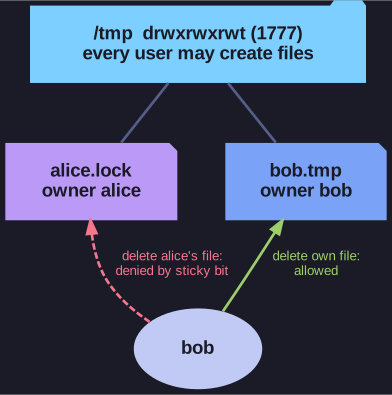
* Everyone may create files in /tmp, but only the owner may delete or rename them. *
/tmp is shown as drwxrwxrwt: everyone may create files there (rwx for others), and the t in the last position is the sticky bit (chmod 1777).
The problem it solves: deleting a file is a write on the directory, not on the file. Without the sticky bit, any user could delete or replace any other user's temporary files in /tmp. That allows sabotage (removing another program's lock or socket file), and an attacker could even swap in a file of their own, for example a symlink pointing at a sensitive file. With the sticky bit, everyone can still create files, but each user can only remove their own.
On regular files the sticky bit has no effect on modern Linux. A capital T means sticky is set but others do not have x.
Go deeper:
 Wikipedia: Sticky bit — history of the bit and its meaning on directories today.