What does access-based enumeration (ABE) do on a file share?
With ABE, users only see the files and folders they have at least read access to; everything else is hidden from the listing instead of showing up and returning "Access denied".
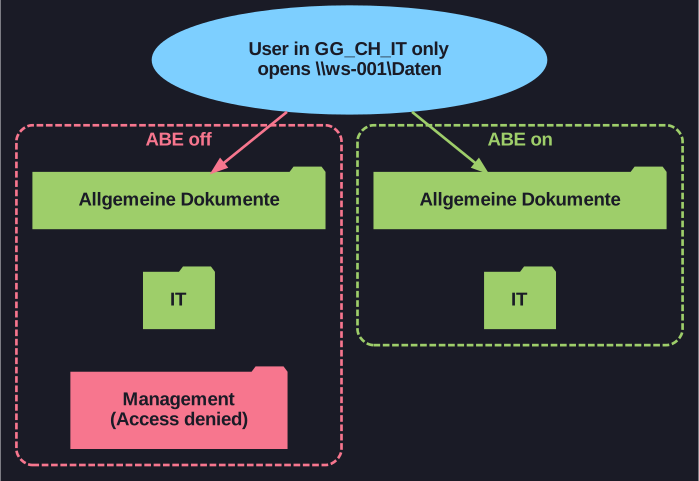
* ABE hides what the user cannot read; NTFS still controls access. *
Without ABE, a user opening \\ws-001\Daten sees all subfolders (Allgemeine Dokumente, IT, Management) and only gets an error when opening one they have no rights to. That leaks information: the mere folder names ("Layoffs 2026", "Merger X") can be sensitive, and they invite curiosity.
With ABE enabled (Server Manager > File and Storage Services > Shares > Properties > Settings), a user who is only in the IT group sees just Allgemeine Dokumente and IT. ABE changes only what is listed; the NTFS permissions still decide what can be accessed.
Go deeper:
 Microsoft Learn archive: Access-based enumeration — what ABE filters and how to switch it on.
 Microsoft Learn: Set-SmbShare —
 -FolderEnumerationMode AccessBasedenables it from PowerShell.