Quiz Entry - updated: 2026.10.13
What does a minimal systemd service unit contain, and how is a new service brought up?
A unit file in /etc/systemd/system/ with [Unit], [Service] and [Install] sections; after systemctl daemon-reload it is started with systemctl start and checked with systemctl status.
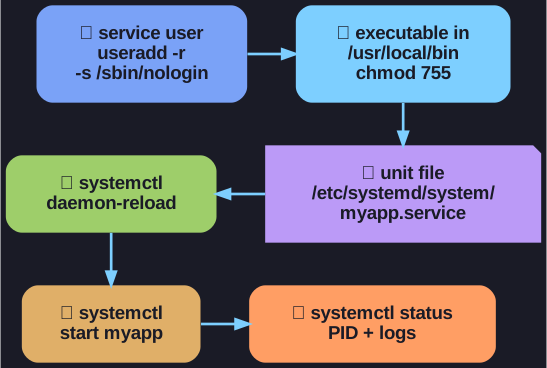
* From service account to a running, supervised service. *
[Unit]
Description=Manage Myapp service

[Service]
ExecStart=/usr/local/bin/myapp
User=myappuser
Type=simple
Restart=on-failure
RestartSec=10

[Install]
WantedBy=multi-user.target
| Directive | Meaning |
|---|---|
ExecStart |
The program to run |
User |
The account it runs as: the service account, not root |
Type=simple |
The started process itself is the service |
Restart=on-failure, RestartSec=10 |
If it crashes, restart it after 10 seconds |
WantedBy=multi-user.target |
Start it at boot in the normal multi-user state, once it is enabled |
Then:
sudo systemctl daemon-reload: systemd re-reads all unit files and learns about the new one.sudo systemctl start myapp: start it now (enablewould also start it at every boot).sudo systemctl status myapp: shows whether it runs, its PID and the latest log lines.
systemd is the init system (PID 1) of almost all current distributions. It starts and supervises services, so an application is not just started by hand in a terminal.
Go deeper:
 man7.org: systemd.service(5) — every
 [Service]directive, including Type and Restart.- Wikipedia: systemd — what systemd replaced and how units work.