What does a Genie parser do, and why is it better than parsing CLI output yourself?
device.parse("show …") runs a show command and returns its output as a structured dictionary. You don't write regexes, and you get one data structure across device types and OS versions.
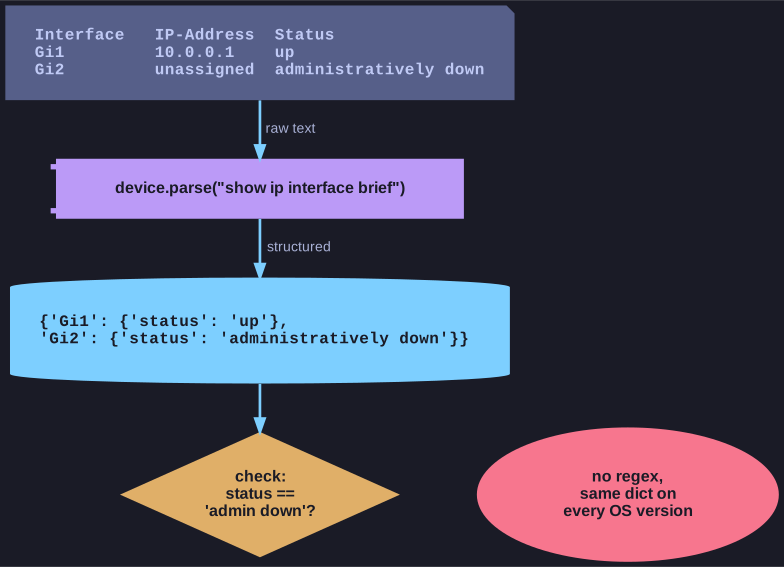
* The parser turns human-oriented CLI text into a dictionary, so a check is a lookup instead of a regex. *
Raw CLI output is text meant for humans. To check it in a script you would normally write regular expressions, which break as soon as a column shifts or a new OS version changes the wording. Genie ships parsers for thousands of show commands and does that work for you:
parsed = device.parse("show ip interface brief")
for intf, d in parsed.items():                    # structured, not text
    if d["status"] == "administratively down":
        print(f"{intf} is shut down")

bgp = device.parse("show ip bgp summary")
for nbr, info in bgp["vrf"]["default"]["neighbor"].items():
    if info["state"] != "Established":
        print(f"BGP neighbour {nbr} not established")
This makes targeted checks for specific values, states or patterns easy, for example:
- is an interface administratively down?
- is a BGP neighbour not established?
- is a VLAN missing (
"100" not in device.parse("show vlan brief")["vlans"])? - is CPU load too high (
five_sec_cpu_total > 80)?
Advantages:
- no manual regex parsing,
- one data structure for different devices and OS versions,
- ideal for automated tests, validations and audits, for example running these checks before and after every change.
Go deeper:
 Genie documentation — Parsers — how to call parsers and use their output.
 Genie feature browser — parser list — search which show commands have a parser per OS.