Quiz Entry - updated: 2026.10.20
How does certificate-based mutual TLS authentication between a browser and a web server work, step by step?
Both sides present certificates and each verifies the other's against a CA it trusts; the client also signs the handshake to prove it holds its private key.
- Client requests a protected resource (opens the TLS connection).
- Server presents its certificate, and asks for a client certificate (CertificateRequest).
- Client verifies the server certificate: chain to a trusted root, validity, host name in the SAN, revocation.
- Client presents its certificate and signs the handshake transcript with its private key (CertificateVerify), which proves possession, so a copied certificate alone is useless.
- Server verifies the client certificate against its configured CA chain (and, if configured, asks OCSP whether it is revoked).
- Access to the protected resource is granted.
In a plain HTTPS connection only steps 1–3 happen: the server is authenticated, the user is anonymous until they log in. Mutual TLS authenticates the user without any password prompt, which is why it suits an intranet: the certificate already sits in the user's Windows store.
Server and client certificates may come from the same CA (as with CKTECK) but in practice usually come from different ones.
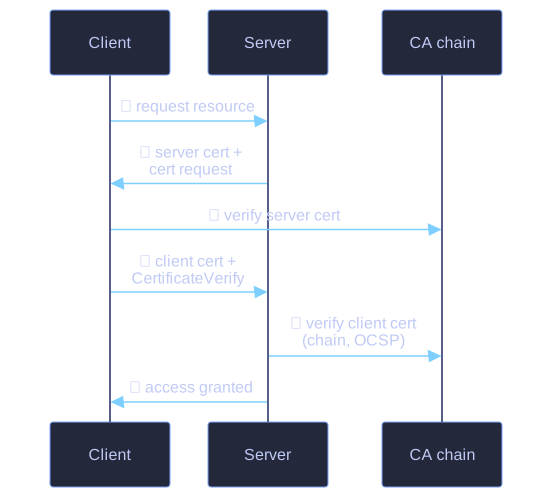
* Mutual authentication: both sides prove their identity. *
Go deeper:
 Oracle Java EE tutorial: HTTPS Client Authentication — the six-step mutual authentication figure this flow follows.
- Wikipedia: Mutual authentication — mTLS and other mutual schemes.
 Computerphile: Transport Layer Security (TLS) — the handshake that carries these certificates.