Quiz Entry - updated: 2026.10.20
How does a Certificate Signing Request work, and which key is used where?
The applicant signs the request with its own private key to prove it holds the matching key; the CA checks that signature with the public key inside the request, then signs the certificate with the CA's private key.
- Applicant generates a key pair and builds the request: its public key + the requested subject name and extensions.
- Applicant signs the request with its private key. This is proof of possession: it shows the request was made by whoever holds the private key matching the enclosed public key, so nobody can ask for a certificate on someone else's public key.
- CA verifies that signature using the public key in the CSR. It also checks that the requester may have such a certificate (here: AD login to
/certsrvand permission on the "Web Server" template). - CA issues the certificate: it fills in issuer, serial number, validity and possibly overrides extensions from its template, then signs everything with the CA's private key.
- Applicant installs the certificate next to its private key (
www.cerin/etc/ssl/certs/). - Clients later verify the certificate with the CA's public key (from the CA certificate in their trust store).
Keys at a glance: the applicant's private key signs the CSR and stays home; its public key travels in the CSR and ends up in the certificate; the CA's private key signs the certificate; the CA's public key verifies it.
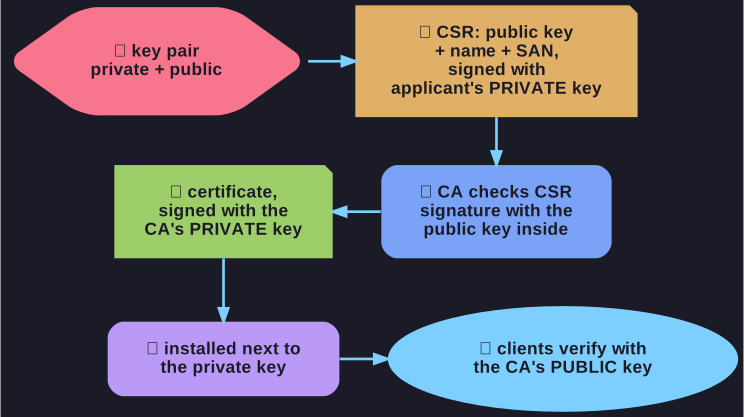
* Which key signs what in a certificate request. *
Go deeper:
 Wikipedia: Certificate signing request — the proof-of-possession signature explained.