How does a blue/green deployment work?
Two identical production environments run side by side. The new release goes to the idle one (green), traffic is switched over after acceptance testing, and the old one (blue) stays ready as an instant rollback.
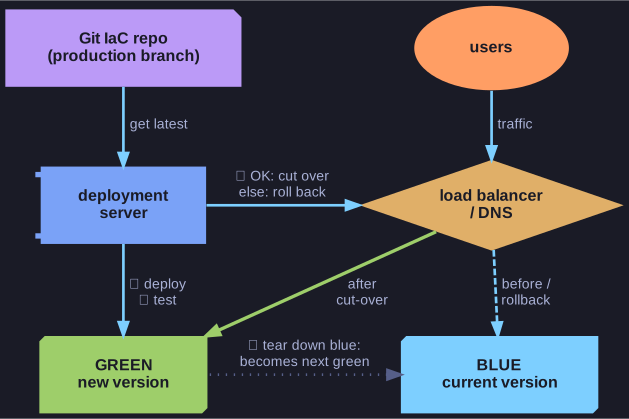
* Deploy and test on the idle environment, switch traffic at the load balancer, switch back on trouble; the old environment becomes the next target. *
The goal is to reduce or eliminate downtime during a release. It needs two things: two identical production environments, and the ability to redirect application traffic between them quickly, for example with a load balancer or DNS.
- Blue is live and serves all users. Green is idle.
- The new release is deployed to green and goes through acceptance testing there, without any user seeing it.
- Traffic is switched from blue to green.
- If problems appear, traffic is switched back to blue, which is still running the old version, so rollback takes seconds.
- Once green is judged sound, blue's resources can be released, and the roles swap for the next release: green is now live and blue becomes the target.
The colours don't matter. Any two names work, and some teams say red/black.
The cost of this approach is having double the production capacity, at least during the release.
Go deeper:
 Martin Fowler — Blue Green Deployment — the original description, including the database caveat.
- Blue–green deployment — Wikipedia — short overview and related strategies.